

This guide shows how to test a prompt before you ship it. Tests help you deploy reliable AI applications.

Testing in the Playground

Testing a prompt in the playground

Use the Playground to test prompt variations quickly.
  1. Load a previous prompt into the Playground.
  2. Apply different variables to the prompt.
  3. Run the prompt.
  4. Examine the results to validate the performance of the prompt.
Phoenix records each single-run test in the Playground as a span in the Playground project. Use these spans to examine LLM invocations later. You can add these spans to datasets, or load them again for more tests.

Testing a prompt over a dataset

Test a prompt over a golden dataset to run the prompt on N examples at the same time.
  1. Create a dataset. In each example, put the prompt variables in the inputs and the ideal LLM answer in the outputs.
  2. Run the prompt over the dataset in the Playground.
  3. Compare the generated answers with the golden answers.
The Playground uses datasets and experiments to help you improve your prompts step by step. Phoenix records experiment runs automatically, so you can evaluate them later. Use these evaluations to see how changes to your prompt, LLM model, or invocation parameters change performance.

Testing prompt variations side-by-side

The Playground can compare multiple prompt variants side by side.
  1. Click + Compare to add a new variant.
  2. Run the variants with Span Replay or over a Dataset.
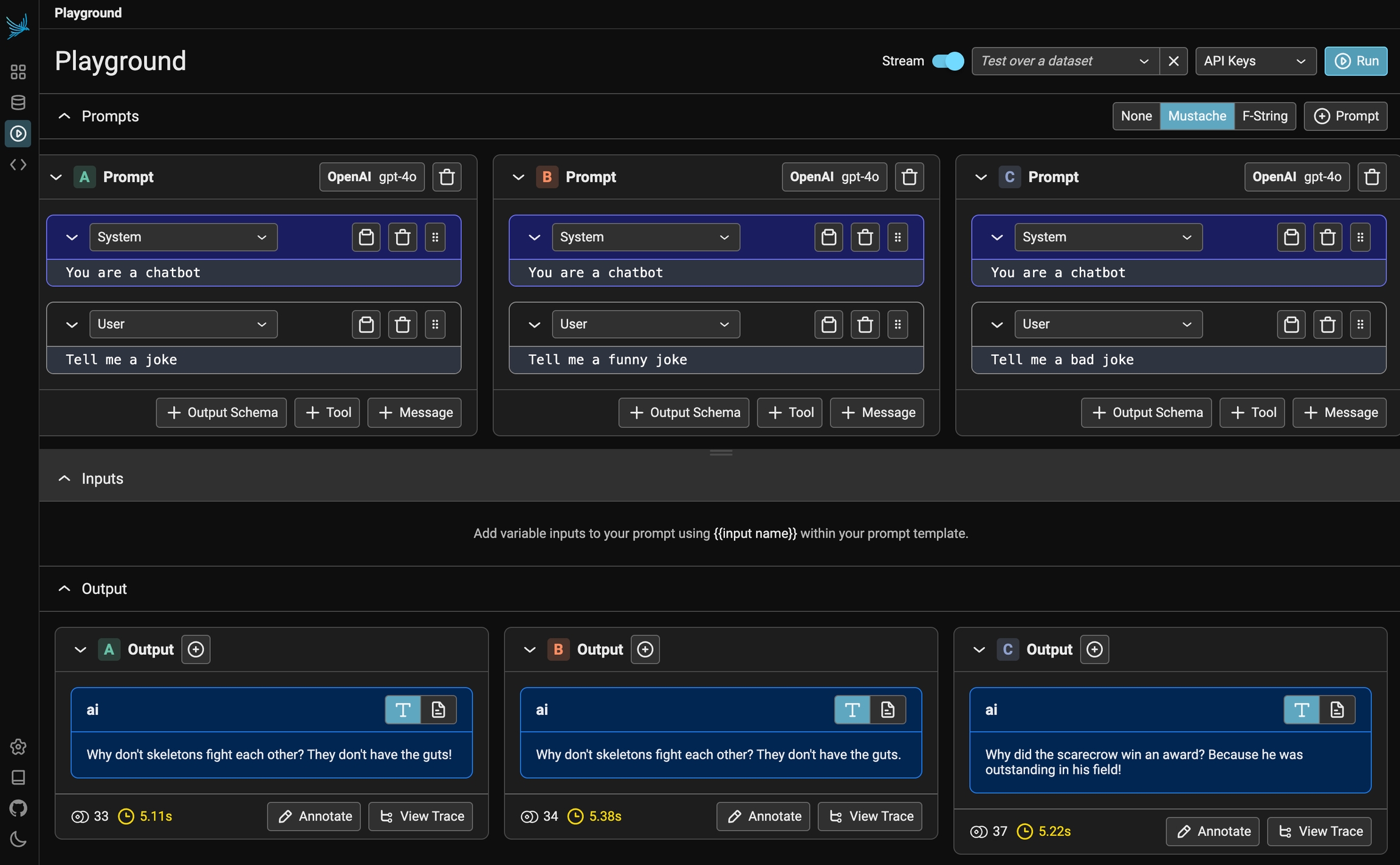
The Playground sends the inputs through each variant and shows the results next to each other.
Phoenix playground comparing prompt variations side by side

Testing multiple prompts simultaneously

Testing a prompt using code

Test a prompt in code to run evaluations on it. Use this method when you must manipulate the data in a custom way. For example, use it to change a system prompt over many different chat messages. 🚧 This tutorial is coming soon