

An AI agent might call the wrong tool or miss a step needed to complete a user’s request. Changing a prompt to fix those failures can also affect other responses, so you need to test whether your changes help. That’s where Phoenix Academy can help. You’ll learn how to use tracing, evaluation, and experiments to understand agent behavior and test changes. We’ll use Wonder Toys, a shopping assistant agent, to show how those changes affect quality, cost, and response time.

How teams improve an agent

Fixing one response doesn’t tell you whether an agent will handle other requests better. The agent improvement cycle connects understanding a failure with testing a change and reviewing new requests after release. You’ll practice each stage with Wonder Toys.
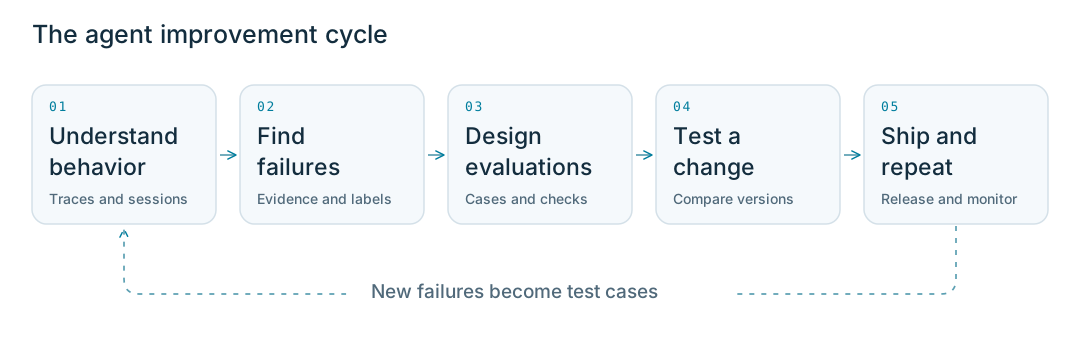
The agent improvement cycle: understand behavior, find failures, design evaluations, test a change, ship and repeatThe agent improvement cycle: understand behavior, find failures, design evaluations, test a change, ship and repeat
Each stage builds on what you learned in the previous one:
  • Understand behavior: Inspect a trace, the record of an agent’s steps, to understand how it reached a result. Follow related requests together as a conversation.
  • Find failures: Review traces and feedback to find recurring problems. Save representative requests as test cases.
  • Design evaluations: Turn your requirements into checks, then verify that those checks give you results you can trust.
  • Test a change: Compare versions using the same test cases and evaluations. Check what improves, what gets worse, and how cost and response time change.
  • Ship and repeat: Use that evidence to decide whether a change is ready. Review new requests after release and add useful cases to your tests.
You can follow the lessons in order or choose the stage relevant to your work. As you learn more, you may return to an earlier stage to investigate a failure or refine an evaluation.

Meet Wonder Toys

Wonder Toys searches for toys, places demo orders, and checks order status. This one-minute walkthrough shows the assistant and a recorded request in Phoenix.

Start learning

Start with Capture your first agent run. You’ll set up the Wonder Toys agent, add tracing, and capture your first request in Phoenix. You’ll use that trace to explore how the agent works in the following lessons.