

Getting started with Phoenix
Not sure where to start? Try an end-to-end tutorial for a guided walkthrough of Phoenix’s core features. These tutorials cover tracing, evaluation, and experimentation:
Python Walkthrough

TypeScript Walkthrough
Featured AI Engineering Workflows
Discover workflows that illustrate how teams use Phoenix to build, evaluate, and scale AI systems.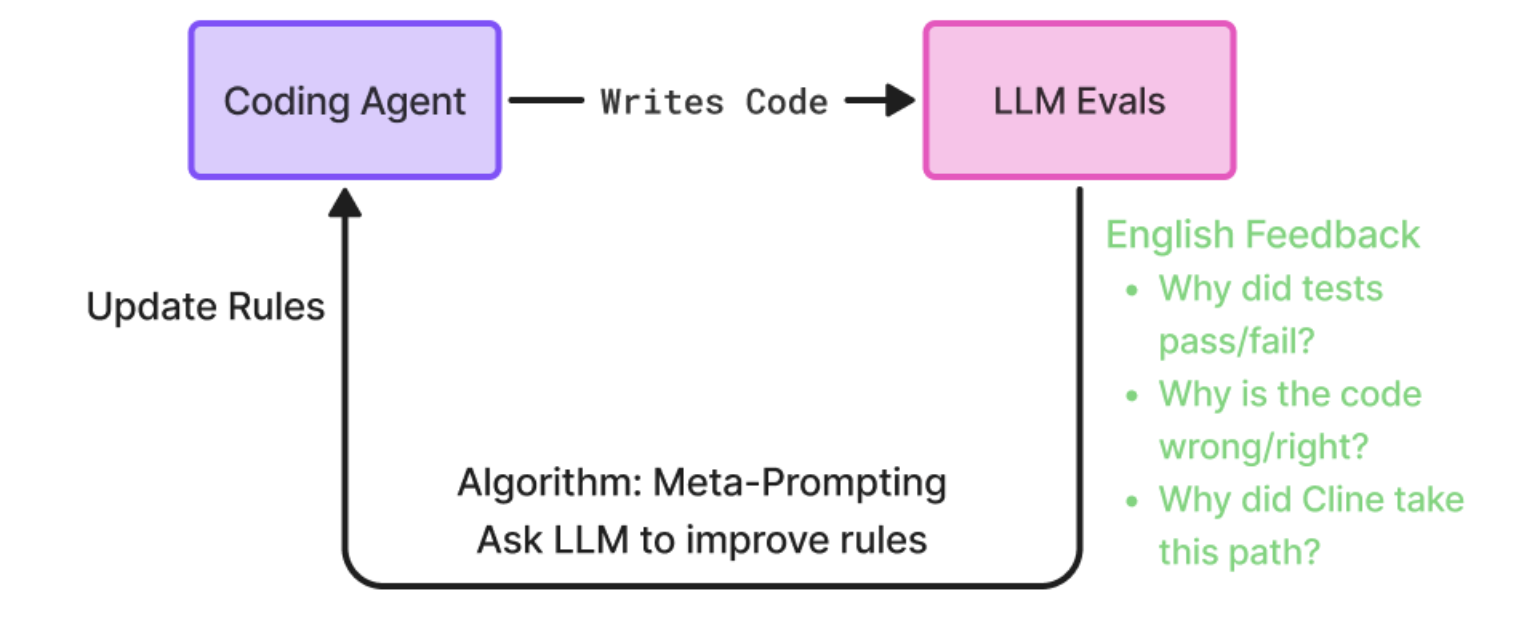
Optimizing Coding Agent Prompts - Prompt Learning

Aligning LLM Evals with Human Feedback

Write your First Custom LLM Eval
Agent Demos
These example agents are fully instrumented with OpenInference and utilize end-to-end tracing with Phoenix for comprehensive performance analysis. Enter your Phoenix and OpenAI keys to view traces.
Code Generation Agent
Explore a Code Generator Copilot Agent designed to generate, optimize, and validate code.

RAG Agent
Enter a source URL and collect traces in Phoenix to see how a RAG Agent can retrieve and generate accurate responses.

Computer Use Agent
Test out a Computer Use (Operator) Agent built to execute commands, edit files, and manage system operations.