

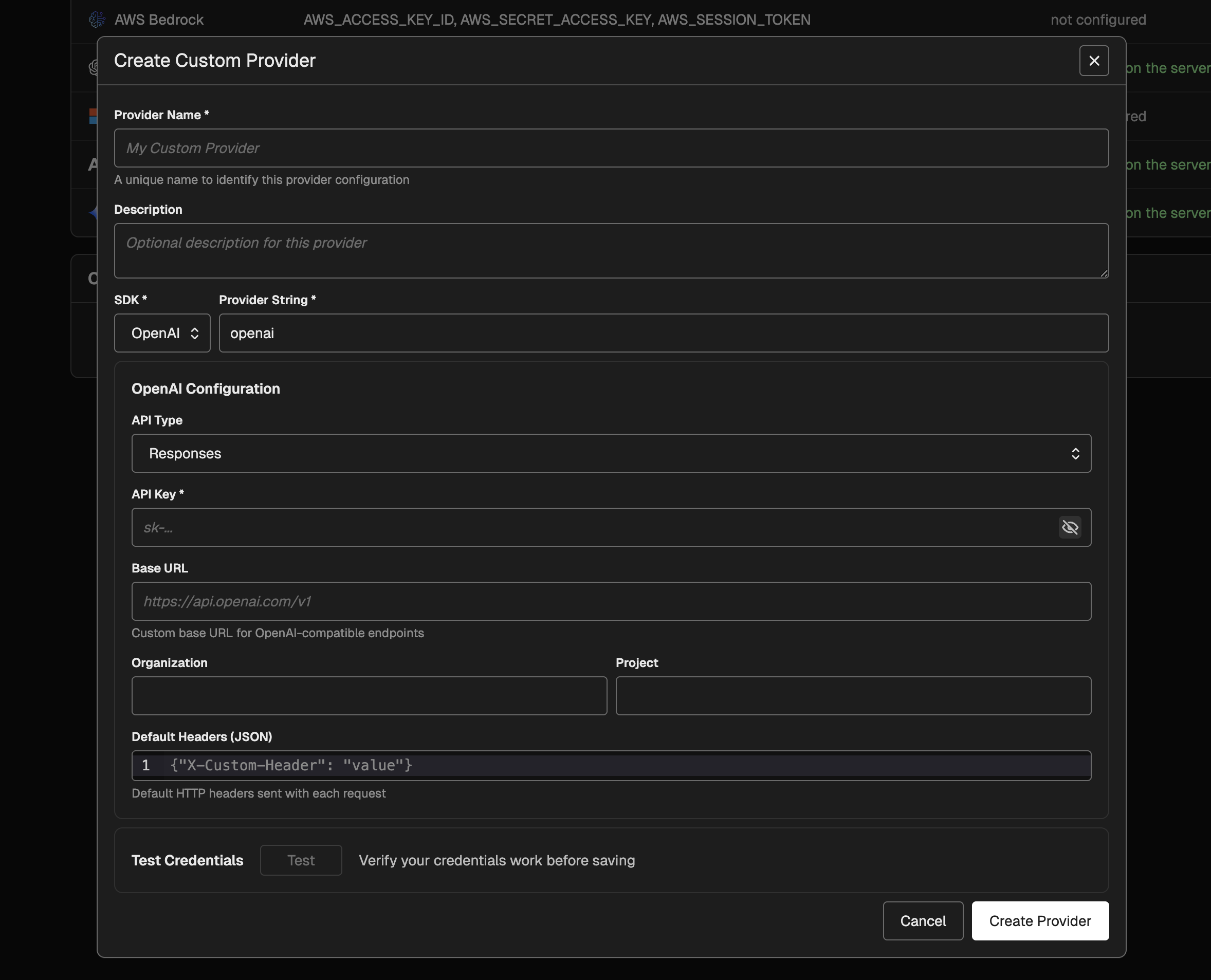
Creating a Custom Provider
To create a custom provider:- Go to Settings → AI Providers.
- In Custom Providers, select New Provider.
- Enter a Name and a Provider String.
- Choose the SDK and fill in the required fields.
- Click Test to validate the credentials, then Create Provider.
Supported SDKs and Fields
OpenAI- Required: API key, API type (Chat Completions or Responses)
- Optional: Base URL, Organization, Project, Default headers
- Required: Endpoint, authentication method
- API key auth: API key
- AD token provider auth: Tenant ID, Client ID, Client Secret (Scope optional)
- Default credentials auth: Endpoint only
- Optional: Default headers
- Required: API key
- Optional: Base URL, Default headers
- Required: Region, authentication method
- Access keys auth: Access Key ID, Secret Access Key (Session Token optional)
- Default credentials auth: Region only
- Optional: Endpoint URL
- Required: API key
- Optional: Base URL, Headers
Example: Azure OpenAI Configuration
Azure OpenAI supports three authentication methods in Phoenix. Here is how to configure each one.API Key Authentication
Best for simple deployments or quick prototyping.- Endpoint: Your Azure OpenAI endpoint (e.g.,
https://my-resource.openai.azure.com/). - Auth Method: Select API Key.
- API Key: Enter one of the keys from the “Keys and Endpoint” blade in the Azure Portal.
Azure Active Directory (Service Principal)
Best for production environments where you have a dedicated Service Principal.- Endpoint: Your Azure OpenAI endpoint.
- Auth Method: Select Azure AD Token Provider.
- Tenant ID: The Directory (tenant) ID from your App Registration.
- Client ID: The Application (client) ID from your App Registration.
- Client Secret: A valid client secret for the App Registration.
Ensure the Service Principal has the Cognitive Services OpenAI User role assigned on the Azure OpenAI resource.
Default Credentials (Managed Identity)
Best for applications running on Azure infrastructure (VMs, App Service, AKS) or local development with Azure CLI.- Endpoint: Your Azure OpenAI endpoint.
- Auth Method: Select Default Credentials.
- Environment variables (
AZURE_CLIENT_ID,AZURE_CLIENT_SECRET,AZURE_TENANT_ID). - Workload Identity (AKS).
- Managed Identity (when running on Azure services).
- Azure CLI (local development).
Example: AWS Bedrock Configuration
AWS Bedrock supports two authentication methods in Phoenix.Access Keys Authentication
Best for cross-account access or scenarios requiring explicit IAM user credentials.- Region: The AWS region where your Bedrock models are enabled (e.g.,
us-east-1). - Auth Method: Select Access Keys.
- Access Key ID: Your IAM user’s access key ID.
- Secret Access Key: Your IAM user’s secret access key.
- Session Token: (Optional) Temporary session token if using temporary credentials.
Default Credentials (IAM Role)
Best for applications running on AWS infrastructure (EC2, ECS, EKS, Lambda) or local development with AWS CLI.- Region: The AWS region where your Bedrock models are enabled.
- Auth Method: Select Default Credentials.
- Environment variables (
AWS_ACCESS_KEY_ID,AWS_SECRET_ACCESS_KEY). - Shared credentials file (
~/.aws/credentials). - ECS/EKS Task Roles.
- EC2 Instance Metadata (IAM Role attached to the instance).
Configuration Tips
- Azure OpenAI Endpoints: You only need to provide the base resource URL (e.g.,
https://my-resource.openai.azure.com/). Phoenix automatically appends the necessary/openai/v1path. - Azure AD Scope: The default scope for Azure AD Token Provider is
https://cognitiveservices.azure.com/.default. This works for most Azure OpenAI resources. - Environment Isolation: Custom providers (except “Default Credentials”) are isolated from the server’s local environment variables. This ensures that the credentials you save are exactly what is used, preventing accidental leakage from server-side environment configurations.
- Encryption: API keys and secrets stored in custom provider configurations are encrypted at rest in the database. Note that if the server’s
PHOENIX_SECRETenvironment variable is changed, previously stored entries will become unreadable and will need to be updated.
Usage
Once configured, custom providers appear in model selection menus in the Playground as their own provider group.- The model list mirrors the built-in model list for that SDK.
- Routing fields (base URL, Azure endpoint, AWS region) are pulled from the custom provider configuration.
- Prompt versions saved with a custom provider will use that provider’s configuration.