- Build a travel planning agent using the Agno framework and OpenAI models
- Instrument and trace your agent with Phoenix
- Create a dataset and upload it to Phoenix
- Define LLM-based evaluators to assess agent performance
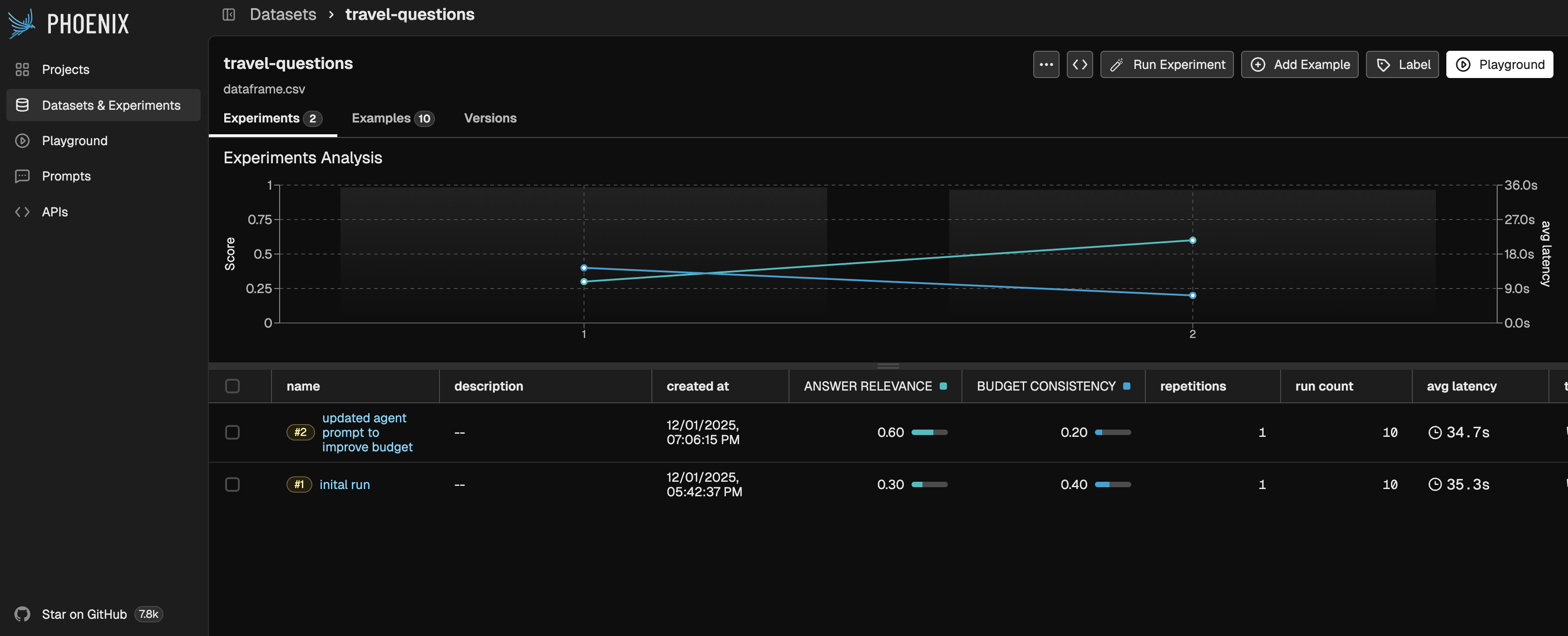
- Run experiments to measure performance changes
- Iterate on agent prompts and re-run experiments to observe improvements
- A running Phoenix instance (
uvx arize-phoenix serve, or see self-hosting) - A free Tavily API key
- An OpenAI API key
Google Colab
Notebook Walkthrough
We will go through key code snippets on this page. To follow the full tutorial, check out the Colab notebook above.Install Dependencies and Set Up Keys
First, install the required packages:Set Up Tracing
Theregister function from phoenix.otel sets up instrumentation so your agent will automatically send traces to Phoenix.
tracer object to manually instrument some functions:
Define Agent Tools
In this section, we’ll build our travel agent. Users will be able to describe their destination, travel dates, and interests, and the agent will generate a customized, budget-conscious itinerary.Helper Functions
First, we’ll define helper functions to support our agent’s tools. We’ll use Tavily Search to gather general information about destinations and Open-Meteo to get weather information.Agent Tools
Our agent will have access to three tools. Use the steps below to view each tool description.1
Essential Info Tool
Provides key travel details about the destination, such as weather and general conditions.
2
Budget Basics Tool
Offers insights into travel costs and helps plan budgets based on selected activities.
3
Local Flavor Tool
Recommends unique local experiences and cultural highlights.
Build the Agent
Next, we’ll construct our agent. The Agno framework makes this process straightforward by allowing us to easily define key parameters such as the model, instructions, and tools.Define & Upload Dataset
In order to experiment with our agent, we first need to define a dataset for it to run on. This provides a standardized way to evaluate the agent’s behavior across consistent inputs. In this example, we’ll use a small dataset of ten examples and upload it to Phoenix using the Phoenix Client. Once uploaded, all experiments will be tracked alongside this dataset.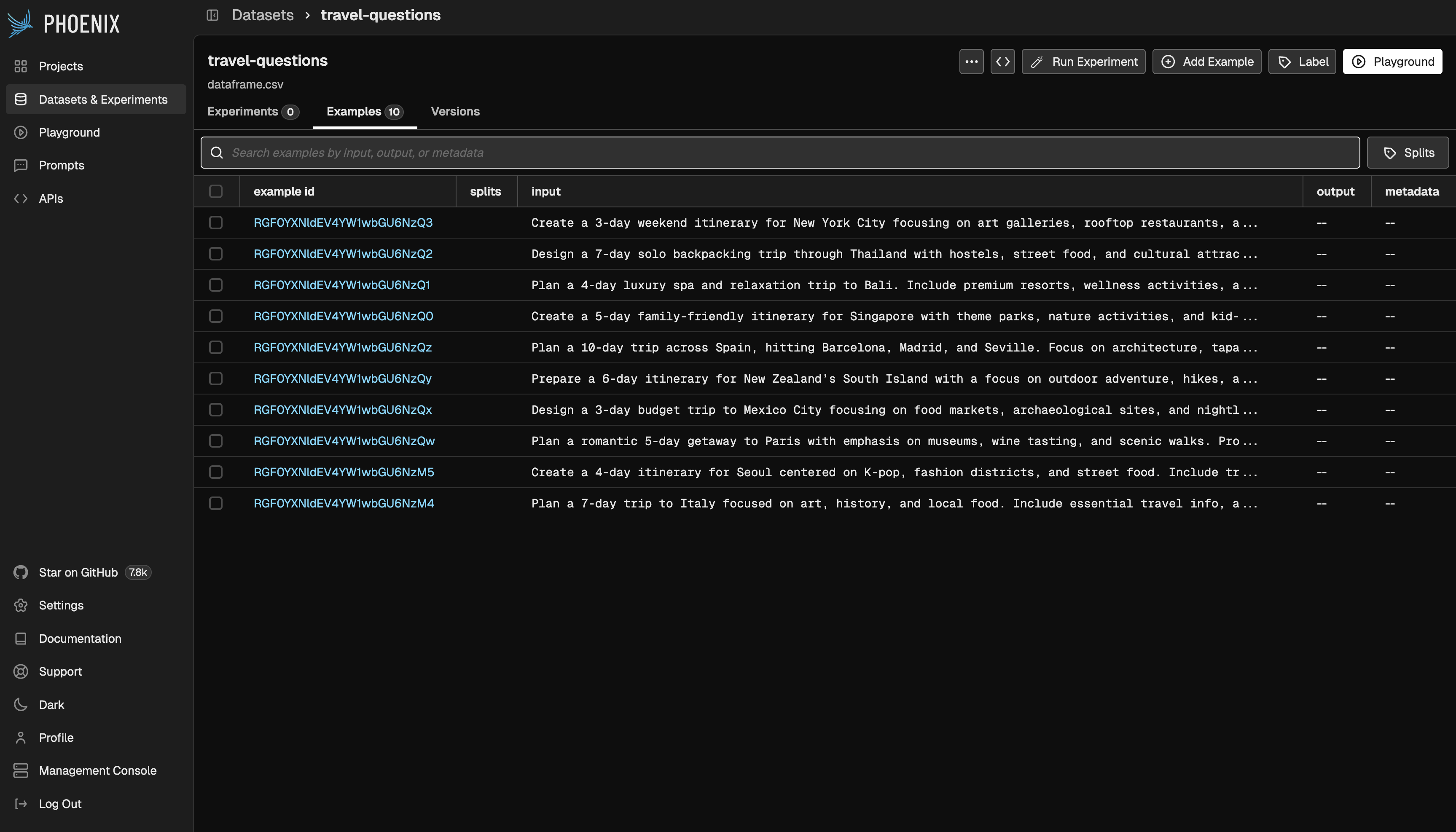
Define Evaluators
Next, we need a way to assess the agent’s outputs. This is where Evals come in. Evals provide a structured method for measuring whether an agent’s responses meet the requirements defined in a dataset—such as accuracy, relevance, consistency, or safety. In this tutorial, we will be using LLM-as-a-Judge Evals, which rely on another LLM acting as the evaluator. We define a prompt describing the exact criteria we want to evaluate, and then pass the input and the agent-generated output from each dataset example into that evaluator prompt. The evaluator LLM then returns a score along with a natural-language explanation justifying why the score was assigned. This allows us to automatically grade the agent’s performance across many examples, giving us quantitative metrics as well as qualitative insight into failure cases.Answer Relevance Evaluator
Budget Consistency Evaluator
Run Experiment
The last step before running our experiment is to explicitly define the task. Although we know we are evaluating an agent, we must wrap it in a simple function that takes an input and returns the agent’s output. This function becomes the task that the experiment will execute for each example in the dataset.Analyze Experiment Traces & Results
Now that the experiment has run on each dataset example, you can explore the results in Phoenix. You’ll be able to:- View the full trace emitted by the agent and step through each action it took
- Inspect evaluation outputs for every example, including scores, labels, and explanations
- Examine the evaluation traces themselves (i.e., the LLM-as-a-Judge reasoning)
- Review aggregate evaluation scores across the entire dataset
Human Annotations
In addition to Evals, you can also add human annotations to your traces. These allow you to capture strong feedback, flag problematic outputs, highlight exemplary responses, and record insights that automated evaluators may miss. Human annotations get saved as part of the trace, helping you guide future iterations of your application or agent.Iterate and Re-Run Experiment
Now that we’ve spent time analyzing the experiment results, it’s time to iterate. We will update the agent’s main prompt to be more intentional about budget calculations, since that area received a lower eval score. You can modify the prompt or make any other adjustments you believe will improve the agent’s performance, and then re-run the experiment to see how the outputs improve—or where they may regress. Iteration is a key part of refining agent behavior, and each experiment provides valuable feedback to guide the next step. Once you reach eval scores and outputs that meet your expectations, you can confidently push those changes to production.