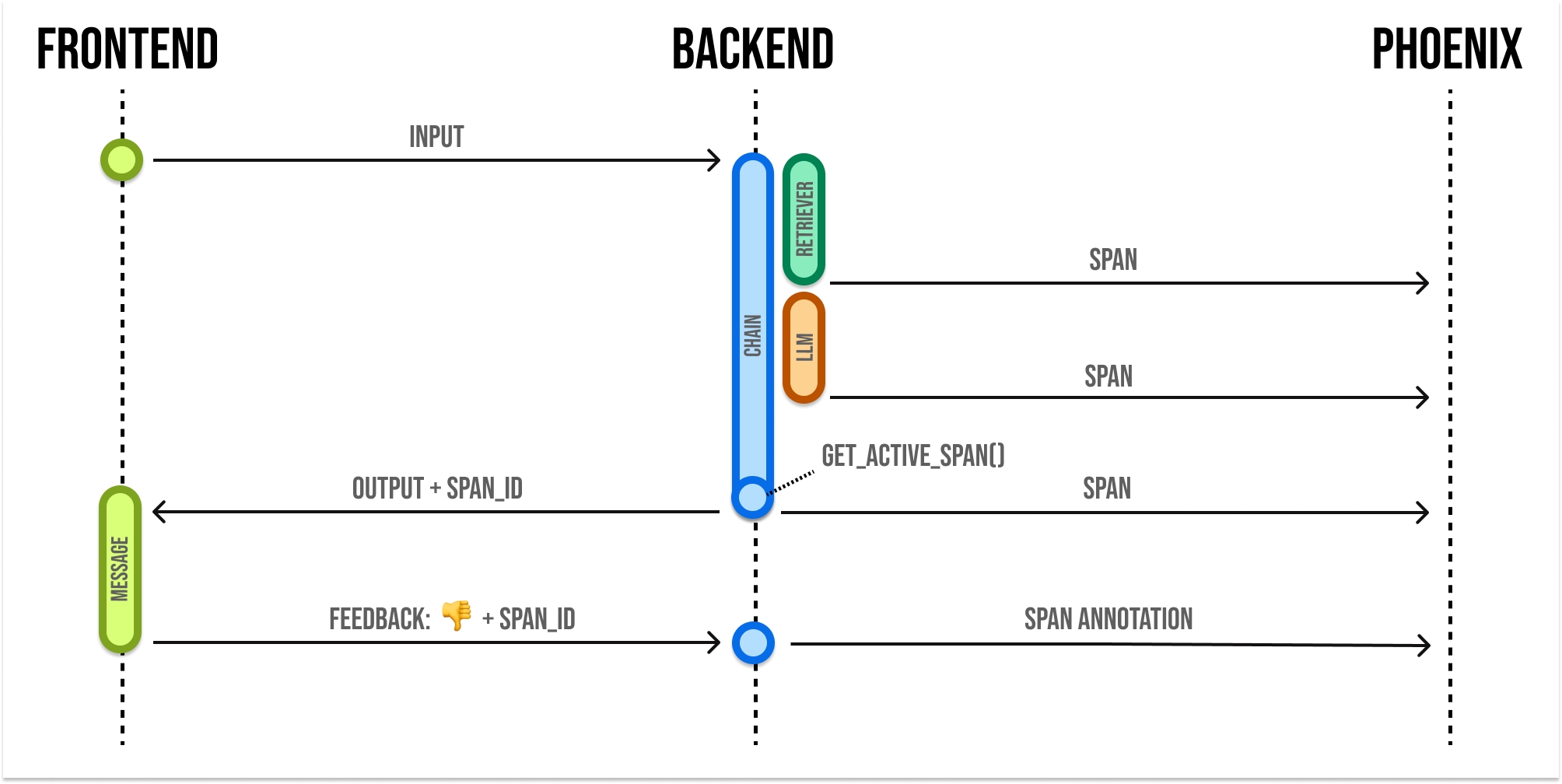
Use the phoenix client to capture end-user feedback
This assumes annotations as of arize-phoenix>=9.0.0.
When building LLM applications, it is important to collect feedback to understand how your app is performing in production. Phoenix lets you attach feedback to spans and traces in the form of annotations.Annotations come from a few different sources:
Human Annotators
End users of your application
LLMs-as-Judges
Basic code checks
You can use the Phoenix SDK and API to attach feedback to a span.Phoenix expects feedback to be in the form of an annotation. Annotations consist of these fields:
{ "span_id": "67f6740bbe1ddc3f", // the id of the span to annotate "name": "correctness", // the name of your annotation "annotator_kind": "HUMAN", // HUMAN, LLM, or CODE "result": { "label": "correct", // A human-readable category for the feedback "score": 0.85, // a numeric score, can be 0 or 1, or a range like 0 to 100 "explanation": "The response answered the question I asked" }, "metadata": { "model": "gpt-4", "threshold_ms": 500, "confidence": "high" }, "identifier": "user-123" // optional, identifies the annotation and enables upserts}
Note that you can provide a label, score, or explanation. With Phoenix an annotation has a name (like correctness), is associated with an annotator (LLM, HUMAN, or CODE), and can be attached to the spans you have logged to Phoenix.
Phoenix allows you to log multiple annotations of the same name to the same span. For example, a single span could have 5 different “correctness” annotations. This can be useful when collecting end user feedback.Note: The API will overwrite span annotations of the same name, unless they have different “identifier” values.If you want to track multiple annotations of the same name on the same span, make sure to include different “identifier” values on each.
Once you construct the annotation, you can send this to Phoenix via its REST API. You can POST an annotation from your application to /v1/span_annotations like so:
These examples use the REST API (/v1/span_annotations), where span_id is an OpenTelemetry hex ID (for example, "67f6740bbe1ddc3f").If you use the GraphQLcreateSpanAnnotations mutation directly, pass the span’s GraphQL id (Global ID), not the OpenTelemetry hex span_id.
If you’re self-hosting Phoenix, be sure to change the endpoint in the code below to <your phoenix endpoint>/v1/span_annotations?sync=false
Python
TypeScript
curl
Retrieve the current span_idIf you’d like to collect feedback on currently instrumented code, you can get the current span using the opentelemetry SDK.
from opentelemetry.trace import format_span_id, get_current_spanspan = get_current_span()span_id = format_span_id(span.get_span_context().span_id)
You can use the span_id to send an annotation associated with that span.