

DECISION spans instead of looking like ordinary LLM calls.
Eval Results in the Trace Tree
September 30, 2026 Available in arize-phoenix 20.18.0+ Large traces are hard to debug when eval results only appear after you open each span. Phoenix now puts annotation summaries under each span row, so you can start with the bad eval and then open the span that caused it.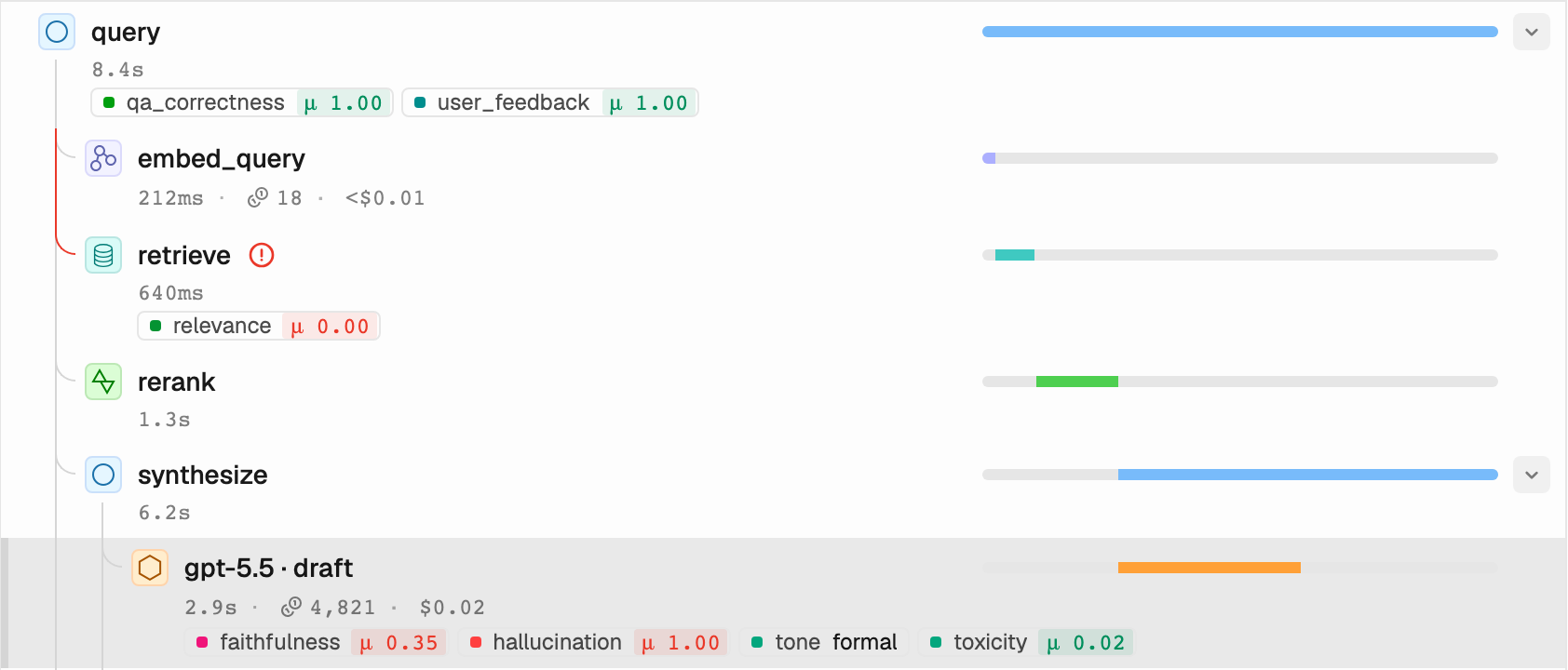
Eval badges appear under span rows in the trace tree, so failed and mixed evals are visible while you scan.
- Scan before opening a span. Each row can show compact badges with the mean score and the most common label for its annotations.
- Start with the failures. Unfavorable results appear first, and extra badges collapse behind a
+Ncount when the tree is narrow. - Hover a row for detail. The span preview lists the full annotation set next to the token and cost breakdown.
- See new eval configs right away. When you link an annotation config to a project, its results show up in the trace tree without a page reload.
Annotate Traces
Add human and LLM annotations to spans
Evaluate Phoenix Traces
Run evals over traces and log the results
Decision Spans
October 1, 2026 Available in arize-phoenix 20.19.0+ Routers, classifiers, and rubric scorers do a different job than chat models. Phoenix now recognizes the OpenInferenceDECISION span kind for calls that score or pick among options, so these calls
are easier to find and no longer look like normal text generation.
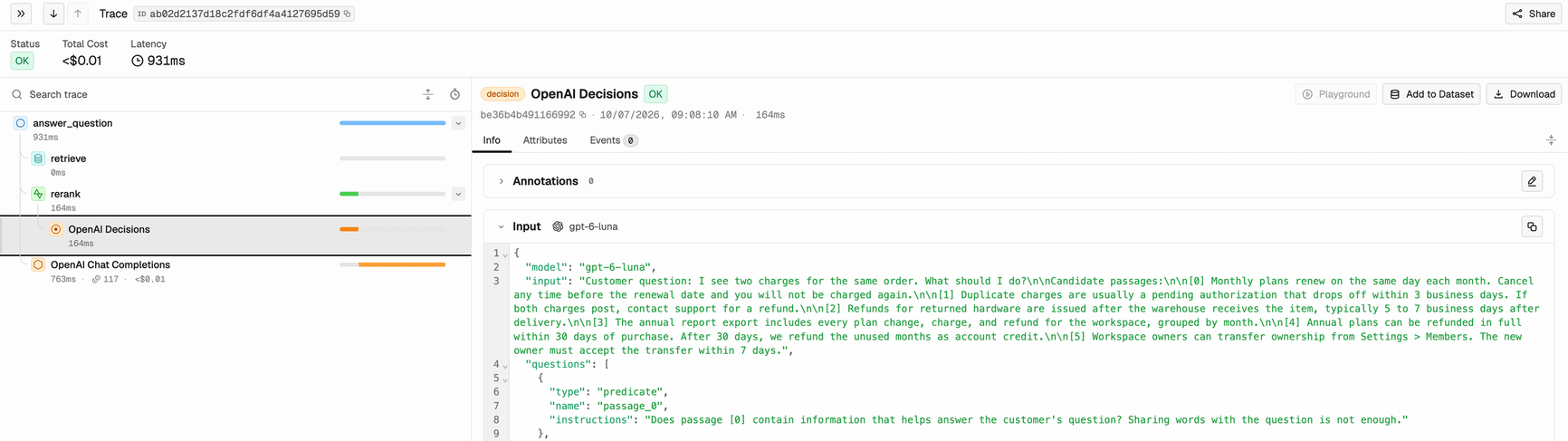
Decision spans get their own icon in the trace tree and a detail view that names the decision model.
- Decision spans get their own icon and detail view. The detail view shows the decision input and output cards instead of the LLM message layout.
- The span view names the decision model. Phoenix uses
decision.model_namewhen it is set, then the provider-reported model, then the requested model. - Filter by
DECISIONanywhere you inspect spans. The span kind works in the UI, the REST API, andpx span list --span-kind DECISION. - OpenInference instrumentors emit decision spans for the OpenAI Decisions API and
TypeSafe AI System One, another decision-model
provider. The
decision.*attributes may still change as more decision-model providers appear.
Span Kinds
DECISION and the other OpenInference span kinds
OpenAI Tracing
Trace the OpenAI Decisions API
TypeScript Client: Project Annotation Configs
September 30, 2026 Available in @arizeai/phoenix-client 7.16.0+ (requires Phoenix server 17.16.0+) Teams often assign different eval configs to different projects. The TypeScript client can now manage those assignments from setup scripts or CI, so a project shows the evals that matter for that workflow as soon as traces arrive.assignProjectAnnotationConfigis safe to rerun. Select the config byconfigName,configId, orconfig. UseconfigIdwhen the name contains/.setProjectAnnotationConfigsreplaces the assignment set. It adds and removes assignments to matchconfigIds, and it never deletes the configs themselves.listProjectAnnotationConfigsreturns the full set. The helper pages through every assigned config for you.
Projects API Reference
Every helper on the projects subpath
Additional Improvements
September 30 to October 1, 2026 Available in arize-phoenix 20.17.0–20.19.0-
Experiment metrics include prompt and completion token detail charts, which split tokens into
input, cache, output, reasoning, and audio parts across recent experiments.
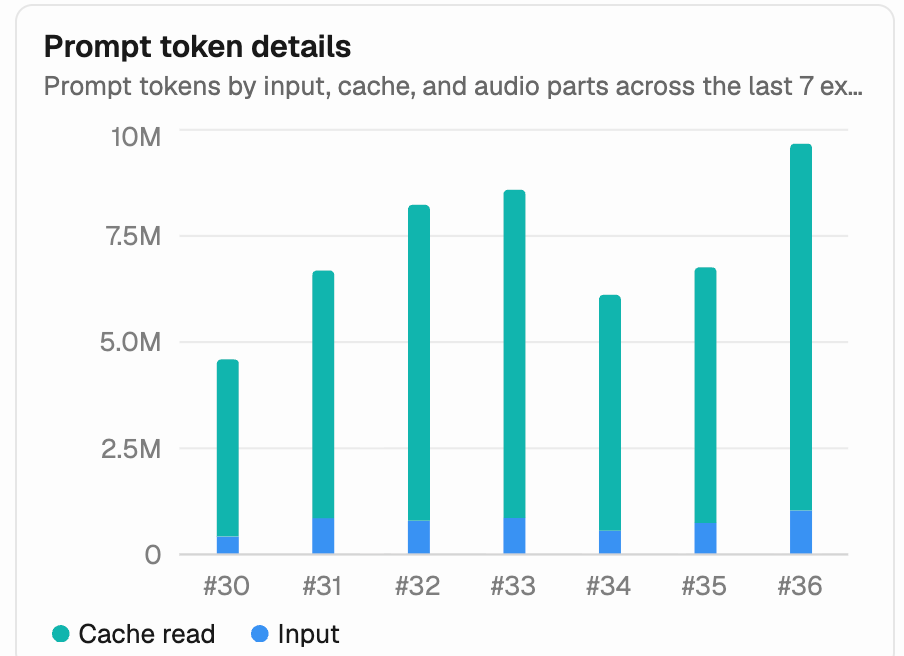
The prompt token details chart splits each experiment's prompt tokens into input and cache reads.
-
PHOENIX_ALLOW_EXTERNAL_RESOURCES=falsenow skips the WebAssembly sandbox download and the UI’s GitHub star count and update check. SetPHOENIX_WASM_BINARY_PATHto use the WebAssembly sandbox offline. -
Dataset.experimentsin GraphQL acceptssortandsequenceNumbers, so you can fetch experiments by their dataset sequence number without paging. - PXI marks a bash tool span as an error when its command exits with a non-zero code.
- Live streaming pauses while a trace or session drawer is open, so the tables behind it stop refreshing.
-
Experiment JSON and CSV exports no longer fail when a run errored. Errored runs export with a
nulloutput. -
Spans that send both OpenInference and
gen_ai.*messages no longer get garbled messages. Phoenix keeps the instrumentation’s own message list instead of mixing the two. - Evaluator input mappings keep their Path or Text mode when you erase and retype a template variable.
- Categorical annotation configs ignore blank category rows when you save them, and saving a playground prompt to an existing prompt prefills metadata from its latest version.