> ## Documentation Index
> Fetch the complete documentation index at: https://arizeai-433a7140.mintlify.site/llms.txt
> Use this file to discover all available pages before exploring further.
# How Tracing Works
 ## Instrumentation
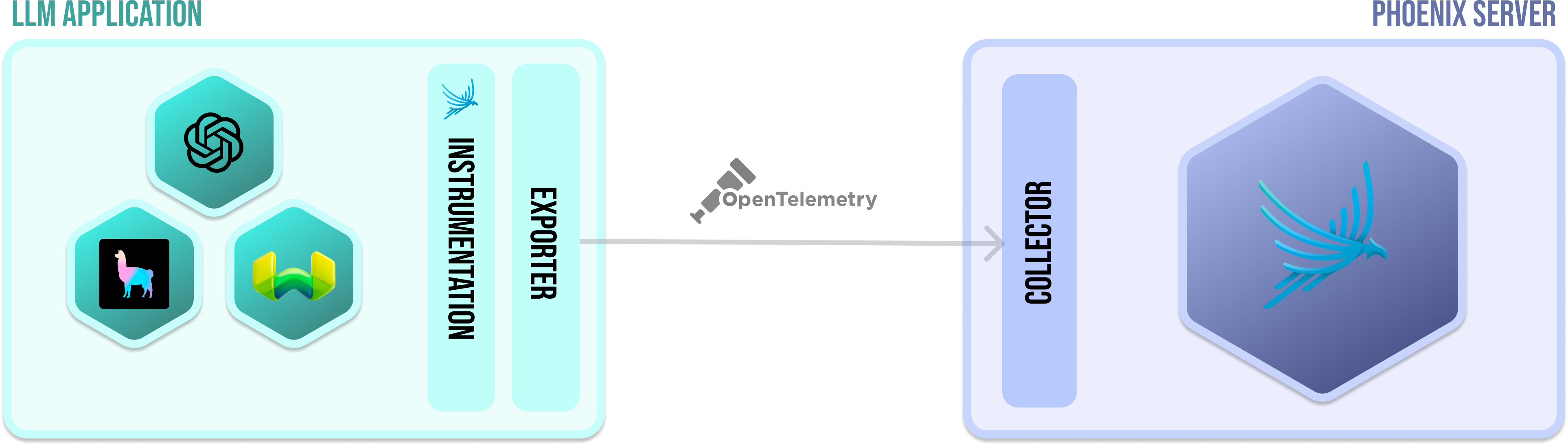
In order for an application to emit traces for analysis, the application must be **instrumented**. Your application can be **manually** instrumented or be **automatically** instrumented.\
\
With phoenix, there a set of plugins (**instrumentors**) that can be added to your application's startup process that perform auto-instrumentation. These plugins collect spans for your application and export them for collection and visualization. For phoenix, all the instrumentors are managed via a single repository called [OpenInference](https://github.com/Arize-ai/openinference). The comprehensive list of instrumentors can be found in the how-to guide.
## Exporter
An exporter takes the spans created via **instrumentation** and exports them to a **collector**. In simple terms, it just sends the data to the Phoenix. When using Phoenix, most of this is completely done under the hood when you call instrument on an instrumentor.
## Collector
The Phoenix server is a collector and a UI that helps you troubleshoot your application in real time. When you run or run phoenix (e.x. **px.launch\_app()**, container), Phoenix starts receiving spans from any application(s) that is exporting spans to it.
## OpenTelememetry Protocol
OpenTelemetetry Protocol (or OTLP for short) is the means by which traces arrive from your application to the Phoenix collector. Phoenix currently supports OTLP over HTTP.
## Instrumentation
In order for an application to emit traces for analysis, the application must be **instrumented**. Your application can be **manually** instrumented or be **automatically** instrumented.\
\
With phoenix, there a set of plugins (**instrumentors**) that can be added to your application's startup process that perform auto-instrumentation. These plugins collect spans for your application and export them for collection and visualization. For phoenix, all the instrumentors are managed via a single repository called [OpenInference](https://github.com/Arize-ai/openinference). The comprehensive list of instrumentors can be found in the how-to guide.
## Exporter
An exporter takes the spans created via **instrumentation** and exports them to a **collector**. In simple terms, it just sends the data to the Phoenix. When using Phoenix, most of this is completely done under the hood when you call instrument on an instrumentor.
## Collector
The Phoenix server is a collector and a UI that helps you troubleshoot your application in real time. When you run or run phoenix (e.x. **px.launch\_app()**, container), Phoenix starts receiving spans from any application(s) that is exporting spans to it.
## OpenTelememetry Protocol
OpenTelemetetry Protocol (or OTLP for short) is the means by which traces arrive from your application to the Phoenix collector. Phoenix currently supports OTLP over HTTP.