> ## Documentation Index
> Fetch the complete documentation index at: https://arizeai-433a7140.mintlify.site/llms.txt
> Use this file to discover all available pages before exploring further.

# Data Retention

By default Phoenix will store and preserve all your data and data retention is entirely under your control. However in production environments there might be good reasons to purge older data.

Similar to data retention being infinite by default, Phoenix also does not gate the deletion of the data. If you no longer need certain projects, traces, datasets, experiments, or prompts, you can delete these resources through the UI as well as through the REST API.

## Project Retention Policies

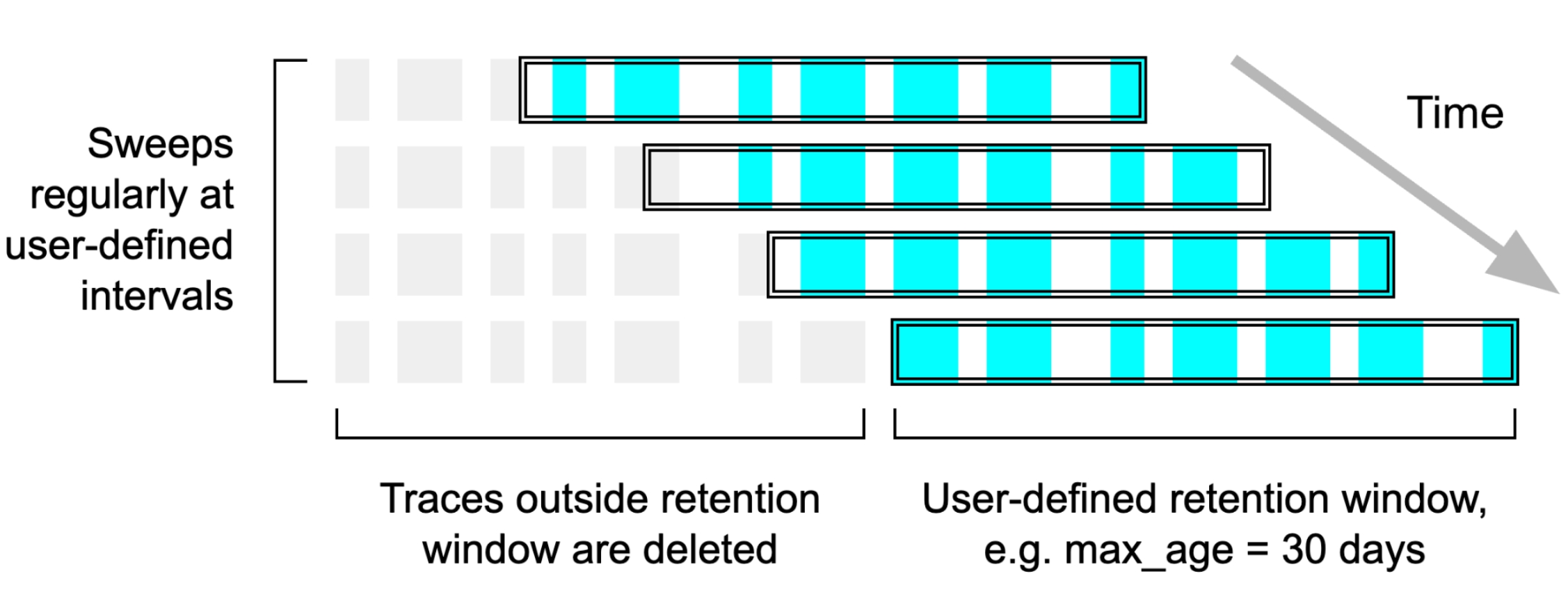
In Phoenix 9.0 or greater you can automatically purge traces from projects by configuring a retention policy. Retention policies can be either time based or trace count based.

<Frame caption="A retention policy starts deleting traces that are outside of the retention window">
  <img src="https://storage.googleapis.com/arize-phoenix-assets/assets/images/phoenix-docs-images/654ba32c-image.jpeg" />
</Frame>

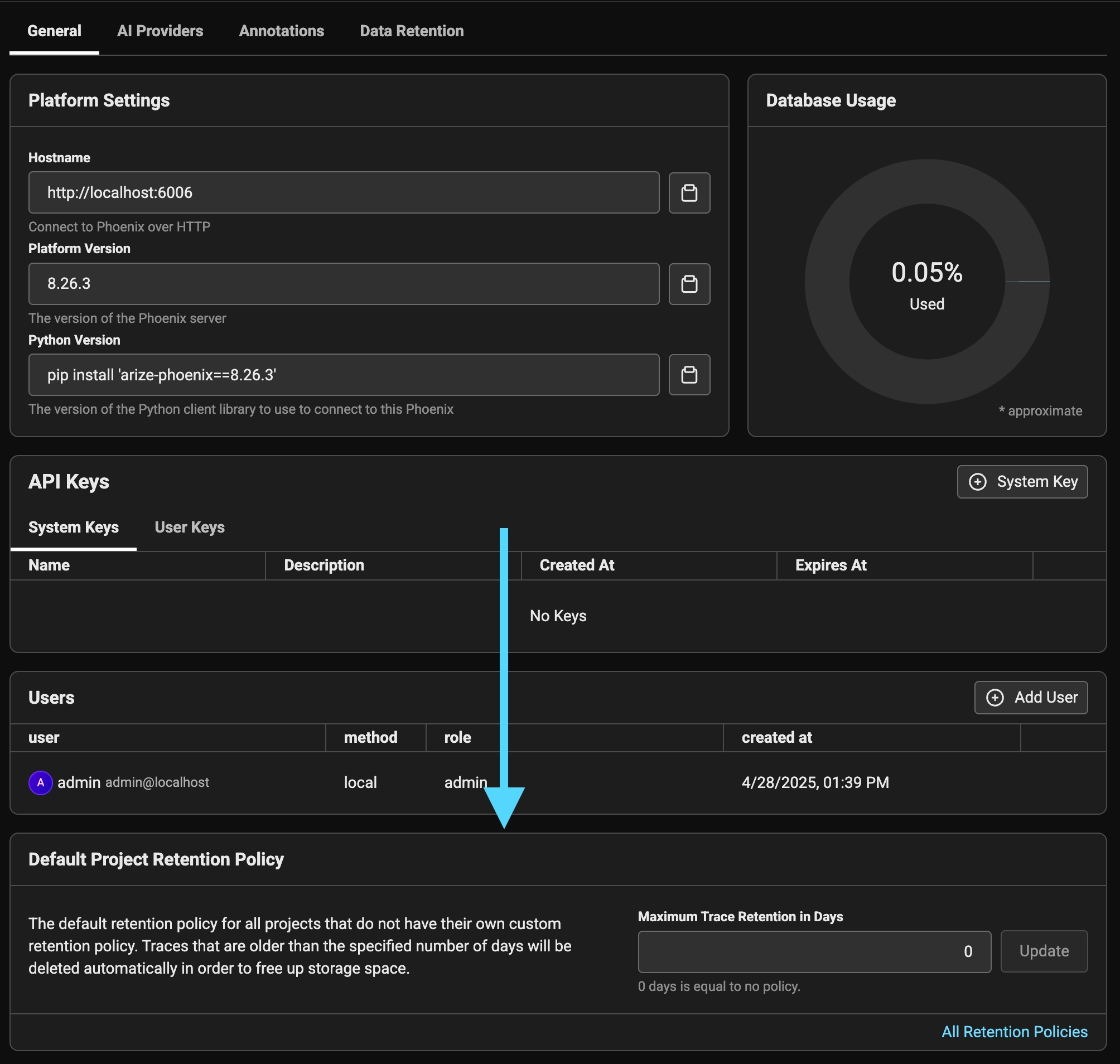
By default Phoenix comes with 1 project retention policy called `Default`. Every project in your instance is associated with this retention policy unless specified otherwise. The `Default` policy also specifies 0 days, which is equal to "Indefinite" retention.
<Info>
  For multi-party data governance, explicit retention and access policies, and auditability across stakeholders, [Arize AX](https://arize.com/docs/ax/security-and-settings/data-fabric) provides a data fabric with defined ownership and control boundaries.
</Info>

### Configuring the Default Retention Policy

The default retention policy can be configured at deployment time using the `PHOENIX_DEFAULT_RETENTION_POLICY_DAYS` environment variable. This is particularly useful for self-hosted deployments where you want to set a consistent retention policy across all projects from the start.

**Environment Variable Configuration:**

* `PHOENIX_DEFAULT_RETENTION_POLICY_DAYS=0` (default) - Infinite retention, no automatic cleanup
* `PHOENIX_DEFAULT_RETENTION_POLICY_DAYS=30` - Automatically delete traces older than 30 days
* `PHOENIX_DEFAULT_RETENTION_POLICY_DAYS=7` - Automatically delete traces older than 7 days

When using Helm, you can set this in your `values.yaml`:

```yaml theme={null}
database:
  defaultRetentionPolicyDays: 30  # Set to desired number of days
```

Or when using Docker directly:

```bash theme={null}
docker run -e PHOENIX_DEFAULT_RETENTION_POLICY_DAYS=30 arizephoenix/phoenix
```

**Important Notes:**

* This setting only affects the default retention policy that applies to all projects
* Individual projects can still override this setting through the Phoenix UI
* Changes to this environment variable will update the default policy for new projects but won't affect existing project-specific policies
* The cleanup runs on a scheduled basis (weekly by default) as configured in the retention policy

<Frame caption="By default phoenix retains all the data you send it">
  <img src="https://storage.googleapis.com/arize-phoenix-assets/assets/images/phoenix-docs-images/2a8882f0-image.jpeg" />
</Frame>

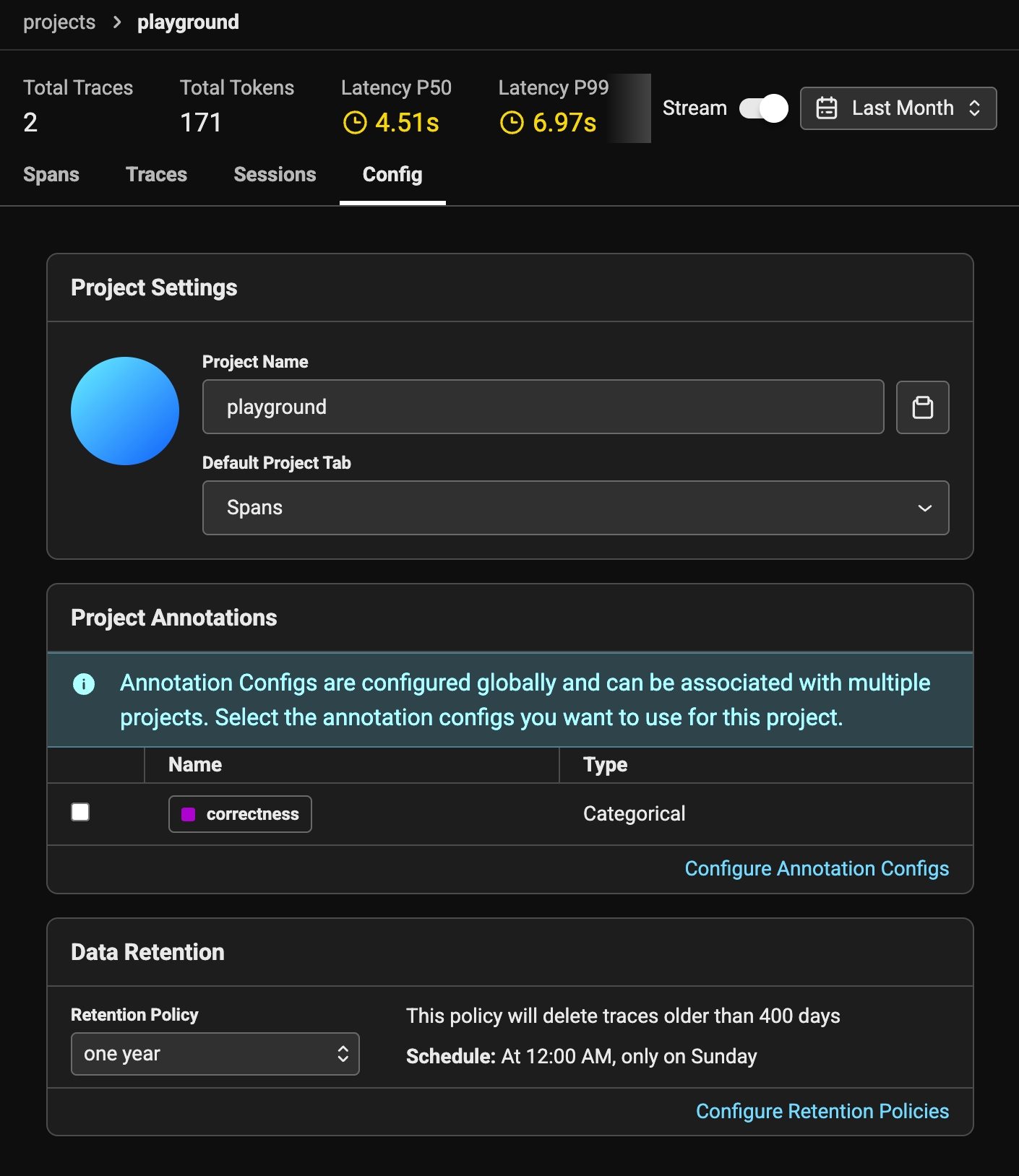
If you simply want to preserve a static set amount of traces per project, you can simply adjust the max days traces will be stored in Phoenix and this will be applied to all current and future projects that get created. In some cases you might want to specify a different retention policy for a particular project (e.g. you might want to age out your playground spans quicker than spans from an actual application). In this case you can navigate to the `Data Retention` tab and create a new policy.
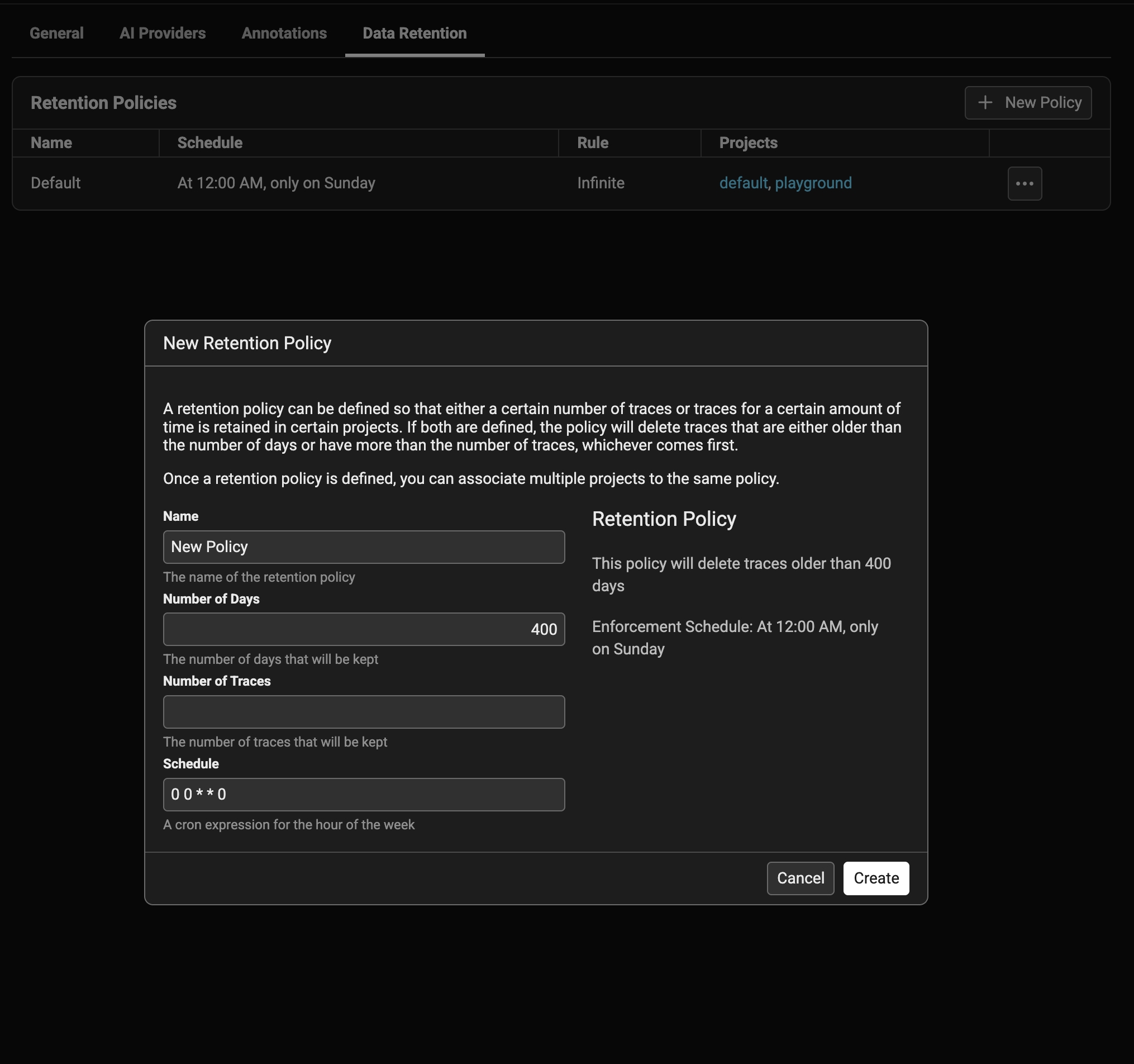
<Frame caption="Create a new retention policy to associate with projects">
  <img src="https://storage.googleapis.com/arize-phoenix-assets/assets/images/phoenix-docs-images/6a7abd89-image.jpeg" />
</Frame>

A policy is made up of:

* **name** - a human friendly name for others to understand it (e.g. "one week")
* **rule** - number of max days and or number of traces that will cause traces to be purged
* **schedule** - a CRON schedule for when the policy will be enforced. It's recommended to do it during non-business hours for the least amount of disruption (if there is any)

Once you have created a policy you can go to the project config and associate the policy to the project. You must be an admin to perform this action.
<Frame caption="Select your new policy in the project config tab">
  <img src="https://storage.googleapis.com/arize-phoenix-assets/assets/images/phoenix-docs-images/3869a5d8-image.jpeg" />
</Frame>

<br />

## Deleting Traces Manually

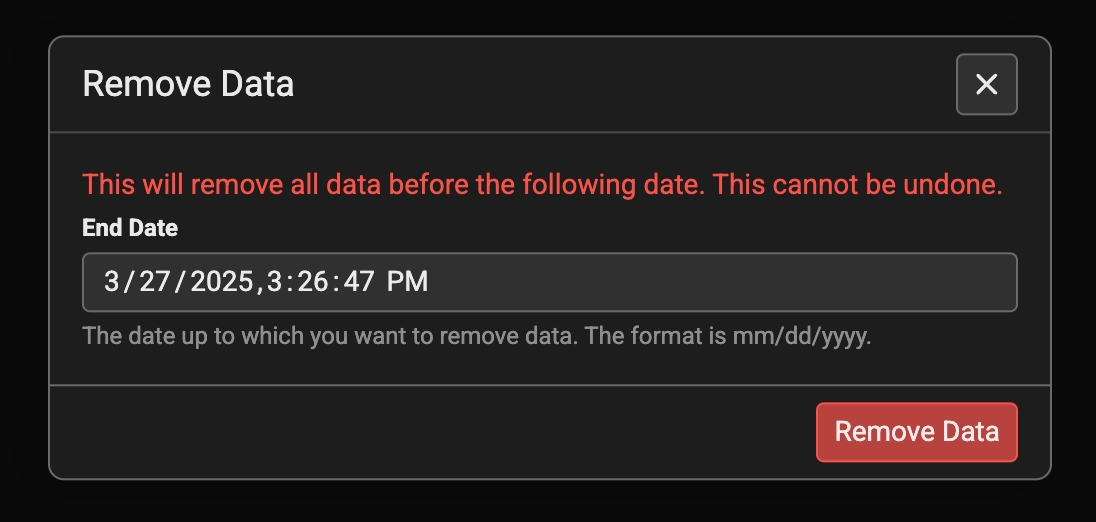
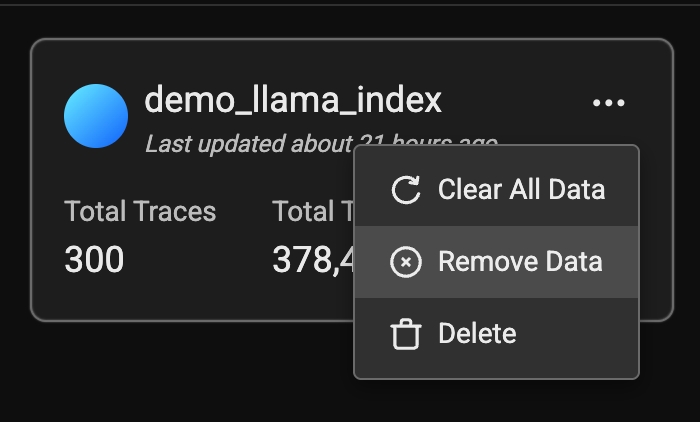
You can either delete traces by time or individually. To delete traces older than a certain date, click on the action button on a project and select `remove data`

<Frame caption="Click Remove Data. You will be able to delete traces older than a certain date.">
  <img src="https://storage.googleapis.com/arize-phoenix-assets/assets/images/phoenix-docs-images/ceeea308-image.jpeg" />
</Frame>

<br />

<Frame caption="Select a date. Traces older than the given date will be purged.">
  <img src="https://storage.googleapis.com/arize-phoenix-assets/assets/images/phoenix-docs-images/3dbac656-image.jpeg" />
</Frame>

<br />

<div>
  <div style={{ position: "relative", paddingBottom: "56.25%", height: "0", overflow: "hidden", marginBottom: "10px" }}>
    <iframe
      src="https://cdn.iframe.ly/Glgk78D"
      style={{
    position: "absolute",
    top: "0",
    left: "0",
    width: "100%",
    height: "100%",
    border: "0"
  }}
      allowFullScreen
      allow="encrypted-media *;"
    />
  </div>

  <div style={{ textAlign: "center", marginBottom: "20px", fontSize: "0.9em", color: "#666" }}>
    How to configure retention policies
  </div>
</div>

## Frequently Asked Questions

### Why doesn't my storage usage decrease after deleting traces?

When you delete traces in Phoenix, the usage metrics in the Settings page will not immediately reflect the freed space. This is because PostgreSQL does not immediately reclaim disk space from deleted rows — instead, it marks them for cleanup through a process called **vacuuming**. PostgreSQL's autovacuum daemon handles this automatically over time. For more details, see the [PostgreSQL documentation on Routine Vacuuming](https://www.postgresql.org/docs/current/routine-vacuuming.html).