> ## Documentation Index
> Fetch the complete documentation index at: https://arizeai-433a7140.mintlify.site/llms.txt
> Use this file to discover all available pages before exploring further.
# Architecture
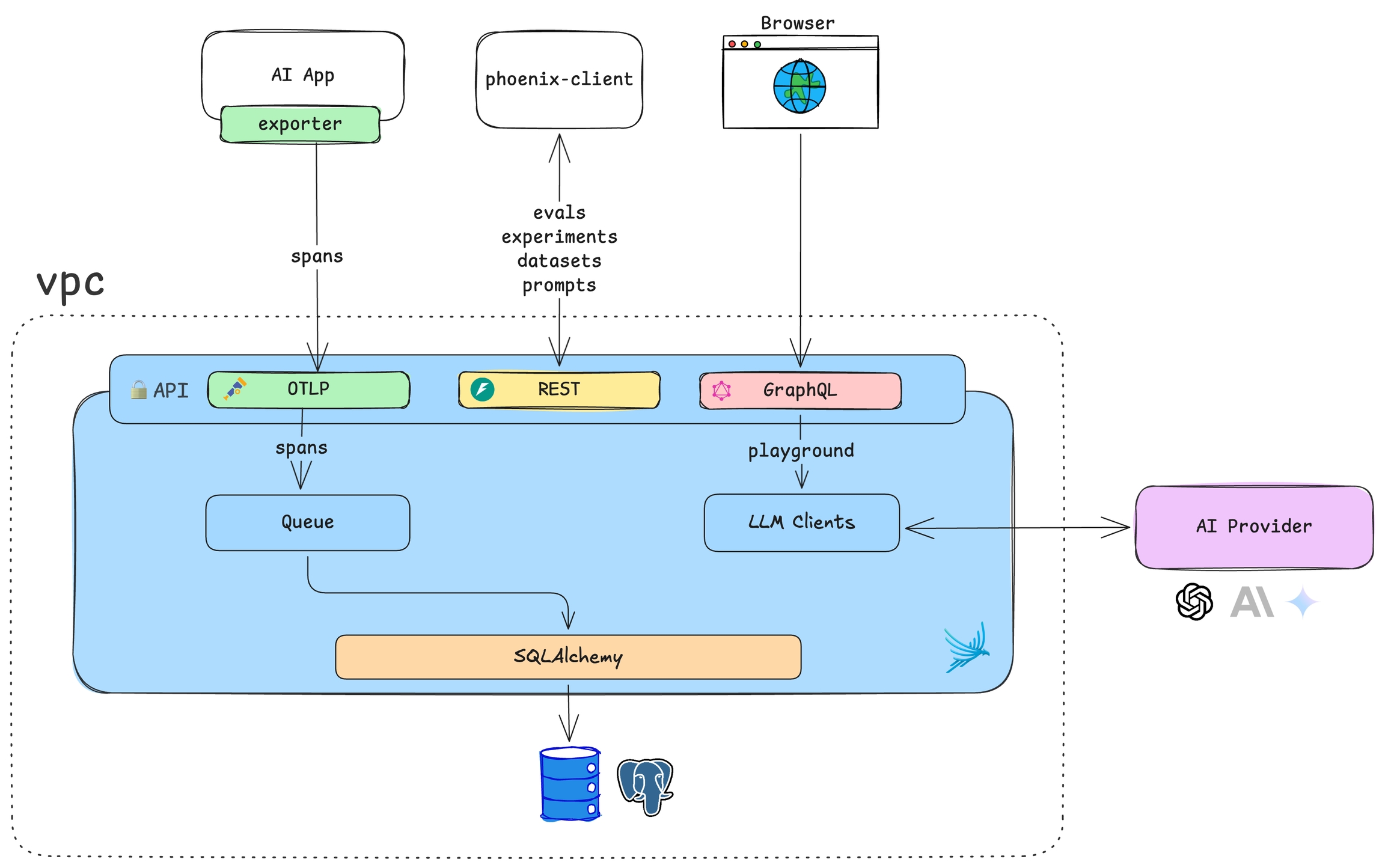 Phoenix is a containerized application that collects and analyzes traces from your LLM applications. It consists of a web UI, trace collector, and SQL database backend.
## Storage
Phoenix supports two database backends. Choose based on your deployment needs:
| Backend | Best For | Configuration |
| :------------- | :----------------------------------------- | :------------------------------------------------------------------------------------------------ |
| **SQLite** | Local development, single-user deployments | Default, no setup required |
| **PostgreSQL** | Production, multi-user, high availability | Set [PHOENIX\_SQL\_DATABASE\_URL](/docs/phoenix/self-hosting/configuration#environment-variables) |
For high-volume ingestion, sub-second queries at scale, and OLAP workloads beyond what SQLite or PostgreSQL are designed for, [Arize AX](https://arize.com/docs/ax/release-notes/history/2025/06-2025#arize-database-adb) runs on [adb](https://arize.com/blog/introducing-adb-arizes-proprietary-olap-database/), Arize's proprietary OLAP database.
### SQLite
The default storage option. Phoenix stores data in `~/.phoenix/` or the directory specified by [PHOENIX\_WORKING\_DIR](/docs/phoenix/self-hosting/configuration#environment-variables). Simple to get started—just mount a volume for persistence.
### PostgreSQL
Recommended for production. Provides better performance, concurrent access, and standard database tooling for backups and replication.
See the [Docker deployment guide](/docs/phoenix/self-hosting/deployment-options/docker#postgresql) for PostgreSQL setup examples.
## Tenancy
A single Phoenix instance represents **one tenant**. All data within an instance—projects, traces, datasets, experiments—is accessible to users based on their [role-based access controls](/docs/phoenix/settings/access-control-rbac).
This single-tenant model keeps deployments simple with clear data isolation boundaries. For multi-team scenarios, deploy multiple Phoenix instances.
When multiple teams rely on the same system and need isolation, [Arize AX](https://arize.com/docs/ax/security-and-settings/sso-and-rbac) provides multi-tenancy via organizations and spaces.
## Scaling
Phoenix scales horizontally by deploying multiple instances. This enables both **performance scaling** (multiple instances sharing load against one database) and **organizational scaling** (separate instances for different teams or environments).
### Performance Scaling
Deploy multiple Phoenix instances behind a load balancer, all connected to the same database:
```mermaid theme={null}
flowchart LR
LB[Load Balancer] --> P1[Phoenix]
LB --> P2[Phoenix]
LB --> P3[Phoenix]
P1 --> DB[(PostgreSQL)]
P2 --> DB
P3 --> DB
```
### Environment Isolation
Deploy separate instances with independent databases for complete data isolation:
```mermaid theme={null}
flowchart LR
P1[Phoenix Prod] --> DB1[(PostgreSQL)]
P2[Phoenix Staging] --> DB2[(PostgreSQL)]
P3[Phoenix Dev] --> DB3[(PostgreSQL)]
```
### Schema Isolation
Share a single database while isolating data using PostgreSQL schemas:
```mermaid theme={null}
flowchart LR
P1[Phoenix Team A] -->|schema_a| DB[(PostgreSQL)]
P2[Phoenix Team B] -->|schema_b| DB
```
Configure with [PHOENIX\_SQL\_DATABASE\_SCHEMA](/docs/phoenix/self-hosting/configuration#environment-variables). See [PostgreSQL schemas](https://www.postgresql.org/docs/current/ddl-schemas.html) for more details.
## Deployment Scenarios
Phoenix's lightweight footprint supports various deployment patterns:
| Scenario | Description | Use Case |
| :---------------------- | :-------------------------------------------------- | :---------------------------------------------------- |
| **Environment-based** | Separate instances for prod, staging, dev | Isolate production data from development |
| **Per-developer** | Each developer runs their own local instance | Rapid iteration without affecting shared environments |
| **Application sidecar** | Phoenix deployed alongside your app in the same pod | Simplified networking and lifecycle management |
| **Centralized** | Single instance for an entire team | Unified view across all applications |
## Future: Resource Tags
Resource tags for fine-grained access control within a single tenant are planned for later in 2026. This will enable permissions scoped to specific projects, datasets, or experiments.
Follow [GitHub issue #10504](https://github.com/Arize-ai/phoenix/issues/10504) for updates on group-based multi-tenancy.
Phoenix is a containerized application that collects and analyzes traces from your LLM applications. It consists of a web UI, trace collector, and SQL database backend.
## Storage
Phoenix supports two database backends. Choose based on your deployment needs:
| Backend | Best For | Configuration |
| :------------- | :----------------------------------------- | :------------------------------------------------------------------------------------------------ |
| **SQLite** | Local development, single-user deployments | Default, no setup required |
| **PostgreSQL** | Production, multi-user, high availability | Set [PHOENIX\_SQL\_DATABASE\_URL](/docs/phoenix/self-hosting/configuration#environment-variables) |
For high-volume ingestion, sub-second queries at scale, and OLAP workloads beyond what SQLite or PostgreSQL are designed for, [Arize AX](https://arize.com/docs/ax/release-notes/history/2025/06-2025#arize-database-adb) runs on [adb](https://arize.com/blog/introducing-adb-arizes-proprietary-olap-database/), Arize's proprietary OLAP database.
### SQLite
The default storage option. Phoenix stores data in `~/.phoenix/` or the directory specified by [PHOENIX\_WORKING\_DIR](/docs/phoenix/self-hosting/configuration#environment-variables). Simple to get started—just mount a volume for persistence.
### PostgreSQL
Recommended for production. Provides better performance, concurrent access, and standard database tooling for backups and replication.
See the [Docker deployment guide](/docs/phoenix/self-hosting/deployment-options/docker#postgresql) for PostgreSQL setup examples.
## Tenancy
A single Phoenix instance represents **one tenant**. All data within an instance—projects, traces, datasets, experiments—is accessible to users based on their [role-based access controls](/docs/phoenix/settings/access-control-rbac).
This single-tenant model keeps deployments simple with clear data isolation boundaries. For multi-team scenarios, deploy multiple Phoenix instances.
When multiple teams rely on the same system and need isolation, [Arize AX](https://arize.com/docs/ax/security-and-settings/sso-and-rbac) provides multi-tenancy via organizations and spaces.
## Scaling
Phoenix scales horizontally by deploying multiple instances. This enables both **performance scaling** (multiple instances sharing load against one database) and **organizational scaling** (separate instances for different teams or environments).
### Performance Scaling
Deploy multiple Phoenix instances behind a load balancer, all connected to the same database:
```mermaid theme={null}
flowchart LR
LB[Load Balancer] --> P1[Phoenix]
LB --> P2[Phoenix]
LB --> P3[Phoenix]
P1 --> DB[(PostgreSQL)]
P2 --> DB
P3 --> DB
```
### Environment Isolation
Deploy separate instances with independent databases for complete data isolation:
```mermaid theme={null}
flowchart LR
P1[Phoenix Prod] --> DB1[(PostgreSQL)]
P2[Phoenix Staging] --> DB2[(PostgreSQL)]
P3[Phoenix Dev] --> DB3[(PostgreSQL)]
```
### Schema Isolation
Share a single database while isolating data using PostgreSQL schemas:
```mermaid theme={null}
flowchart LR
P1[Phoenix Team A] -->|schema_a| DB[(PostgreSQL)]
P2[Phoenix Team B] -->|schema_b| DB
```
Configure with [PHOENIX\_SQL\_DATABASE\_SCHEMA](/docs/phoenix/self-hosting/configuration#environment-variables). See [PostgreSQL schemas](https://www.postgresql.org/docs/current/ddl-schemas.html) for more details.
## Deployment Scenarios
Phoenix's lightweight footprint supports various deployment patterns:
| Scenario | Description | Use Case |
| :---------------------- | :-------------------------------------------------- | :---------------------------------------------------- |
| **Environment-based** | Separate instances for prod, staging, dev | Isolate production data from development |
| **Per-developer** | Each developer runs their own local instance | Rapid iteration without affecting shared environments |
| **Application sidecar** | Phoenix deployed alongside your app in the same pod | Simplified networking and lifecycle management |
| **Centralized** | Single instance for an entire team | Unified view across all applications |
## Future: Resource Tags
Resource tags for fine-grained access control within a single tenant are planned for later in 2026. This will enable permissions scoped to specific projects, datasets, or experiments.
Follow [GitHub issue #10504](https://github.com/Arize-ai/phoenix/issues/10504) for updates on group-based multi-tenancy.