> ## Documentation Index
> Fetch the complete documentation index at: https://arizeai-433a7140.mintlify.site/llms.txt
> Use this file to discover all available pages before exploring further.
# Release Notes
> The latest from the Phoenix team.
export const ReleaseUpdate = ({label, href, title, children}) => {
return
{children}
Read the full update →
;
};
GitHub
**We want to hear from you!** The DevRel team wants to hear from the Phoenix community. If you're building with Phoenix and want to tell us what's working, what's painful, or what you wish existed, [grab 25 minutes with us](https://cal.com/team/arize-devrel/user-interview).
**Available in arize-phoenix 17.15.0–17.20.0, arize-phoenix-client 2.12.0+ (Python), @arizeai/phoenix-client 6.12.0+ and @arizeai/phoenix-evals 1.1.0+ (TypeScript)**
Pin metric charts above your data tables, search the trace tree, and script more of Phoenix from the API and CLI.
* **Metric charts above tables** — a resizable, per-table chart strip over spans, traces, and sessions
* **Trace tree search** — filter the trace tree to jump to the span you need
* **Dataset labels & annotation-config assignment over REST** — manage both from the API
* **Classification-metric evaluators in TypeScript** — precision, recall, and F-score code evaluators
* **`px annotation-config`** CLI commands and **Claude Sonnet 5** in the Playground
**Available in @arizeai/phoenix-cli 1.6.0+ (beta) and arize-phoenix 17.14.0+**
Run PXI from your shell, review annotations from project settings, and copy trace IDs from experiment trace details.
* **PXI terminal client** — launch an interactive PXI chat with `npx -y @arizeai/phoenix-cli pxi`; it connects to your Phoenix instance and runs a model preflight on startup, with `/clear`, `/exit`, and `/help` slash commands in 1.6.1+
* **Annotation summary** — project settings list every annotation name by count for spans, traces, and sessions, with bulk delete by name
* **Copyable trace IDs** — the experiment trace details dialog adds a copy-to-clipboard trace ID badge
**Available in arize-phoenix-client 2.10.0+ (Python) and @arizeai/phoenix-client 6.11.1+ (TypeScript, beta)**
Write LLM evaluations as ordinary pytest, Vitest, or Jest tests — each suite becomes a Phoenix dataset and each run a versioned experiment.
* **Familiar DX** — mark tests with `@pytest.mark.phoenix` or import `describe`/`test` from `@arizeai/phoenix-client/vitest`; keep fixtures, parametrization, watch mode, and `.only`/`.skip`
* **Debug in Phoenix** — every case is traced; LLM-as-judge calls record under their own evaluator span
* **Metrics beyond pass/fail** — log scores, labels, and explanations and track them across experiments
* **CI gates** — per-case asserts plus suite-level acceptance criteria on aggregate scores
* **Reuse evaluators** — pre-built `arize-phoenix-evals` evaluators plug straight into a test case
**Available in arize-phoenix 17.9.0+ through 17.11.0+**
A batch of annotation, label, auth, and PXI improvements rolled out across 17.9–17.11.
* **Trace-level annotations** — trace annotation summaries appear in the trace header and project stats panel alongside span annotations
* **Label management from lists** — filter by label, manage labels inline, and see usage counts on the Prompts and Datasets pages, plus a prompt model column
* **OAuth2 role overrides** — set `ROLE_RESYNC=false` per IDP to keep manually assigned roles from being overwritten on login
* **PXI server bash tool** — subagents gain a sandboxed `bash` with `phoenix-gql`, gated network access, and a `PHOENIX_AGENTS_DISABLE_BASH` kill switch
**Available in arize-phoenix 17.5.0+ through 17.7.0+**
A batch of time range, project metrics, and PXI improvements rolled out across 17.5–17.7.
* **Calendar time range picker** — choose an exact window from a two-month calendar with pan, zoom, and live streaming controls
* **Shareable trace URLs** — trace and session links carry the active time range so a copied link reproduces your view
* **New project metrics** — trace and session annotation scores plus prompt and completion token detail charts over time
* **PXI subagents opt-in** — a settings toggle controls the parallel data-retrieval helpers, off by default
**Available in arize-phoenix 17.4.0+**
Search the time range selector and type free-form durations to land on exactly the window you want.
* **Search presets** — filter the preset list as you type
* **Free-form durations** — `25m`, `2h`, `3d`, or `last 2 hours` create custom windows on the fly
* **Inline editing** — type start and end dates directly in the navbar selector
**Available in arize-phoenix 17.4.0+ (PXI beta)**
The `/` menu in PXI chat now includes local commands like `/clear`, and PXI can manage a dataset's evaluators.
* **`/clear`** — reset the conversation into a fresh session from the chat input
* **Dataset evaluators** — PXI reads evaluator definitions, selects which run on the next playground experiment, and edits existing evaluators as accept/reject diffs
**Available in arize-phoenix 17.3.0+ (PXI beta)**
PXI can now drive much more of Phoenix for you — invoke skills with `/`, fan out parallel subagents, and run full prompt-iteration loops in the playground.
* **Skills menu** — type `/` to invoke skills like `/debug-trace` and `/llm-evaluator-authoring`
* **Subagents** — parallel, read-only data retrieval that keeps big lookups out of the main context
* **Playground orchestration** — load datasets, switch models, set repetitions, manage comparison instances, toggle experiment recording, and cancel runs
* **Evaluator authoring and dataset management** — draft LLM-judge and code evaluators, create datasets, and import spans as examples, all as reviewable diffs
**Available in arize-phoenix 17.3.0+**
The playground now supports Anthropic's Claude Fable 5 — `claude-fable-5` on Anthropic and `anthropic.claude-fable-5` on AWS Bedrock — with cost tracking included.
**Available in arize-phoenix 17.0.0+ (beta)**
PXI (Phoenix Intelligence) is the AI engineering agent built into Phoenix. Hand it an investigation instead of digging through traces, prompts, and experiments yourself — it's context-aware of the trace, prompt, filters, and project you're working in.
* **Operates on your observability data** — inspects traces, iterates on prompts as reviewable diffs, runs experiments, authors evaluators, and annotates spans
* **Controls built in** — state-changing actions require approval, everything runs on your deployment, and PXI can be disabled entirely
**Available in arize-phoenix 16.3.0+**
Click and drag across any project metric chart or the spans sparkline to zoom into a custom time window. All metric panels share the same time-range context, so one brush selection updates latency, error rate, token usage, and trace-count charts simultaneously.
* **All charts covered** — latency, error rate, token usage, and the trace-count sparkline all support brush selection
* **Adaptive tick density** — x-axis labels scale with rendered pixel width, staying readable at any zoom level
**Available in arize-phoenix 16.0.0+**
Write Python or TypeScript `evaluate()` functions directly in the Phoenix UI and attach them to a dataset. Phoenix runs each function in an isolated sandbox and records the output as an annotation on every experiment run — no SDK, local runtime, or deploy step required.
* **Local or hosted sandboxes** — WebAssembly and Deno ship with Phoenix; E2B, Daytona, Vercel, and Modal add network and package support
* **Versioned and traced** — every save creates a new version, and each execution appears as a span
* **Dry-run before saving** — test the evaluator against a real dataset example from the UI
**Available in arize-phoenix 15.10.0+**
Phoenix now automatically converts OTel GenAI semantic convention attributes (`gen_ai.*`) to OpenInference at ingest time. Traces from OpenTelemetry-native instrumentations — OpenAI, Anthropic, and Google GenAI contrib packages — now render with full message I/O, tool calls, retrieval documents, and token counts without code changes.
* **Zero-config** — point any OTel-native instrumentation at Phoenix's OTLP endpoint; conversion happens server-side
* **OpenInference wins** — spans that already carry OpenInference attributes are untouched; conversion only fills in what's missing
* **Full coverage** — input/output messages, tool definitions and results, system instructions, retrieval documents, usage tokens, provider, and model name
**Available in arize-phoenix 15.10.0+ (server), arize-phoenix-client 2.7.0+ (Python)**
* **Session feedback toolbar** — thumbs-up/down and annotate buttons appear on each turn in Session Details; clicking creates a `user_feedback` trace annotation with toggle behavior
* **ATIF v1.7 trajectory upload** — `upload_atif_trajectories_as_spans` now supports embedded subagent trajectories via `subagent_trajectories`, `trajectory_id`-based deterministic span IDs for idempotent re-uploads, `session_id` in trajectory headers, and deterministic dispatch steps (`llm_call_count: 0`)
**Available in arize-phoenix 15.8.0+**
The Playground now exposes first-class extended thinking controls for Anthropic and Google models, persisted with saved prompts.
* **Anthropic** — Thinking mode (adaptive/enabled/off), token budget (min 1,024), thinking display toggle, and output effort level
* **Google** — Thinking budget and thinking level (LOW / MEDIUM / HIGH)
**Available in arize-phoenix 15.7.0+**
* **Expandable session turns** — long messages in Session Details are now collapsed by default with an expand/collapse toggle
* **Note identifier field** — `POST /v1/{trace,span,session}_notes` accepts an optional `identifier` for upsert semantics; repeated calls with the same identifier overwrite the existing note
* **New CLI annotation commands** — `px {trace,span,session}-annotations delete` for bulk-remove by identifier or time range, `px project get ` to fetch project metadata; `--identifier` flag on `annotate` and `add-note`
* **Security** — f-string template formatter now blocks dunder/private attribute traversal, preventing format-string injection through user-supplied variables
**Available in arize-phoenix 15.6.0+**
* **Default provider and model** — save a personal Playground default on the AI Providers settings page; Phoenix stores it in your browser and applies it to every new session
* **Metrics aside always on** — the latency/token/error metrics panel on the right side of the spans table is now visible by default, no longer gated behind a feature flag
**Available in arize-phoenix 15.5.0+**
Set the `x-project-name` HTTP header on OTLP exports to route all spans in the request to a named Phoenix project. The header takes precedence over the `openinference.project.name` resource attribute, so tools like the OpenTelemetry Collector can route traces without modifying the instrumented application.
* **Works with any OTLP sender** — SDK header option, Collector `headers` config, or `OTEL_EXPORTER_OTLP_HEADERS` env var
* **Bug fix** — deleting a dataset evaluator link no longer removes the shared evaluator row (arize-phoenix 15.5.1+)
**Available in arize-phoenix 15.4.0+**
Phoenix Playground and the Prompts library now support vendor-native tools — web search, code execution, computer use, grounding, and more — alongside existing function tools. Paste any provider's tool JSON into the Playground and Phoenix stores and round-trips it verbatim.
* **Generic passthrough** — any tool the provider SDK accepts works without a library update; verified examples include Anthropic `web_search` / `code_execution` / `computer_use`, OpenAI Responses `web_search` / `file_search` / `code_interpreter` / `computer_use_preview`, and Gemini `google_search` grounding
* **Mix with function tools** — provider tools and function tools coexist on the same prompt version
* **SDK export** — Python and TypeScript clients preserve provider tools when formatting prompts
**Available in arize-phoenix 15.3.0–15.4.0+, arize-phoenix-evals 3.1.0+**
* **Filter-based annotation DELETE** — `DELETE /v1/projects/{project}/span_annotations`, `trace_annotations`, and `session_annotations` bulk-remove annotations by `identifier`, `name`, `annotator_kind`, or time range
* **Token counts in REST** — trace and session list endpoints now return `cumulative_token_count_prompt`, `_completion`, and `_total` fields
* **Experiment CSV metadata** — downloading an experiment as CSV now includes per-example dataset metadata as `metadata_` columns
* **Evals runtime capability detection** — OpenAI reasoning models (`o1`, `o3`, `o3-mini`, `o4-mini`) now work with `ClassificationEvaluator` automatically
**Available in @arizeai/openinference-tanstack-ai 0.1.0+**
A new OpenInference middleware for [TanStack AI](https://tanstack.com/ai/latest/docs/getting-started/overview) emits `AGENT`, `LLM`, and `TOOL` spans for `chat()` calls — covering streaming, non-streaming, and tool-loop flows across any TanStack AI provider adapter.
* **Install** — `npm install --save @arizeai/openinference-tanstack-ai @tanstack/ai`
* **Usage** — drop `openInferenceMiddleware()` into the `middleware` option of any `chat()` call
* **Feedback welcome** — this integration is brand new; please reach out via the [OpenInference repo](https://github.com/Arize-ai/openinference)
**Available in @arizeai/phoenix-cli 1.4.0+**
`px profile` commands let you store named connection profiles — endpoint, project, API key, and headers — and switch between Phoenix instances without re-exporting environment variables. The active profile slots into the existing config resolution chain below env vars, so existing scripts are unaffected.
* **Commands** — `px profile create`, `list`, `show`, `edit`, `use`, `delete`
* **Profile status** — `px auth status` surfaces the active profile name
* **Editor autocomplete** — JSON Schema published for `~/.px/profiles.json`
**Available in arize-phoenix 15.1.0+ (server), @arizeai/phoenix-cli 1.4.0+ (CLI), @arizeai/phoenix-client 6.9.0+ (TypeScript)**
* **CLI session annotations** — `px session annotate ` and `px session add-note ` with `--include-annotations` / `--include-notes` flags on list and get
* **TypeScript trace annotations** — `addTraceAnnotation` and `logTraceAnnotations` exported from `@arizeai/phoenix-client/traces`
* **`addSessionNote`** in `@arizeai/phoenix-client/sessions`
* **Query by identifier** — GET annotation endpoints for spans, traces, and sessions accept `?identifier=` to retrieve all annotations sharing a tag, project-wide
**Breaking change in arize-phoenix-client 2.6.0+ (Python) and arize-phoenix 15.0.0+ (server)**
`client.datasets.create_dataset()` now defaults to upsert semantics: if a dataset with the same name exists, examples are merged into the latest version rather than returning a conflict error. Supply a stable `id` on each example for deterministic in-place updates on re-upload.
**Available in arize-phoenix 14.16.0+**
Phoenix now supports creating session notes through `POST /v1/session_notes`. The generic session annotation endpoint now reserves `name="note"` for note-specific APIs, so use `POST /v1/session_notes` for session notes and `POST /v1/session_annotations` for regular annotations.
**Available in arize-phoenix 14.13.0+ (server), @arizeai/phoenix-client 6.8.0+ (TypeScript), @arizeai/phoenix-cli 1.3.0+ (CLI)**
Add notes to traces via the REST endpoint, TypeScript client, or CLI. Notes are stored separately from annotations and support multiple entries per trace.
* **TypeScript** — `addTraceNote({ traceNote: { traceId, note } })` from `@arizeai/phoenix-client/traces`
* **CLI** — `px trace add-note --text "..."` and `--include-notes` flag on `px trace get` / `px trace list`
* **Reserved name** — `note` is no longer accepted on the generic annotation endpoints; use `POST /v1/trace_notes`
**Available in arize-phoenix-otel 0.16.0+**
`arize-phoenix-otel` now re-exports the most common OpenInference context managers and semantic conventions, so manual instrumentation no longer requires installing `openinference-instrumentation` or `openinference-semantic-conventions` as separate dependencies.
* **Context managers** — `using_session`, `using_user`, `using_metadata`, `using_tags`, `using_attributes`, `using_prompt_template`, `suppress_tracing` (usable as `with` blocks or decorators)
* **Semantic conventions** — `SpanAttributes`, `OpenInferenceSpanKindValues`, `OpenInferenceMimeTypeValues`
* **Single install** — `pip install "arize-phoenix-otel>=0.16.0"` is enough for `register()` + context propagation
**Available in arize-phoenix 14.11.0+**
A new **Settings → Secrets** page lets admins add, replace, and delete encrypted LLM provider credentials (e.g. `OPENAI_API_KEY`, `ANTHROPIC_API_KEY`) directly in the Phoenix UI — no REST API calls required.
* **Add / Replace / Delete** secrets from the browser
* **Search and filter** the secrets list by key name or owner
* **Admin-only** — all mutations require admin access
**Available in arize-phoenix-client 2.4.0+**
Evaluator functions now receive the originating trace ID for each experiment run. Add a `trace_id` keyword argument to any evaluator function or `Evaluator` class method to access it.
* **Optional** — evaluators without `trace_id` are unaffected
* **Works sync and async** — supported on both function-based and protocol-based evaluators
**Available in arize-phoenix 14.9.0+ (server), arize-phoenix-client 2.4.0+ (Python), @arizeai/phoenix-client 6.7.0+ (TypeScript)**
Filter spans by stored attribute values using the Python client, TypeScript client, REST API, or CLI. Multiple filters are AND-ed together; the value's JS/Python type selects which storage type is matched.
* **Python** — `client.spans.get_spans(..., attributes={"llm.model_name": "gpt-4o"})`
* **TypeScript** — `getSpans({ ..., attributes: { "llm.model_name": "gpt-4o" } })`
* **CLI** — `px span list --attribute "llm.model_name:gpt-4o"`
* **Type-aware** — `int`, `float`, `bool`, and `str` values each match their corresponding stored type
**Available in @arizeai/phoenix-cli 1.1.0+**
`px span add-note --text "..."` attaches a free-text note to any span. Pass `--include-notes` to `px span list` or `px trace get` to read notes back alongside span data.
**Available in arize-phoenix 14.9.0+**
Claude Opus 4.7 is now available as a model option in the Phoenix Playground. Select it from the model picker to compare outputs against other Anthropic and cross-provider models.
**Available in arize-phoenix 14.8.0+**
Connect Phoenix to Azure Database for PostgreSQL using Microsoft Entra managed identity — no static database password required. Install the `azure` extra and set `PHOENIX_POSTGRES_USE_AZURE_MANAGED_IDENTITY=true`.
* **Zero-credential setup** — tokens are fetched and refreshed automatically on each connection
* **New `[azure]` extra** — `pip install 'arize-phoenix[azure]'` pulls in `azure-identity` and `aiohttp`
* **`PHOENIX_POSTGRES_AWS_IAM_TOKEN_LIFETIME_SECONDS` deprecated** — silently ignored with a startup warning
**Available in @arizeai/phoenix-cli 1.0.4+**
`px span annotate` and `px trace annotate` write labels, scores, and explanations to spans and traces from the terminal. Pass `--include-annotations` to `px trace get` or `px span list` to read annotations back alongside the data.
* **`px span annotate `** — attach a label, score, or explanation to any span by OTel span ID
* **`px trace annotate `** — annotate a full trace by OTel trace ID
* **Annotator kinds** — `HUMAN`, `LLM`, or `CODE`; submitting again with the same name updates the existing entry
**Available in @arizeai/phoenix-otel 1.0.0+**
`@arizeai/phoenix-otel` now re-exports the full `@arizeai/openinference-core` and `@arizeai/openinference-semantic-conventions` surface from a single import.
* **Tracing helpers** — `withSpan`, `traceChain`, `traceAgent`, `traceTool` wrap functions with OpenInference spans and follow global provider changes
* **`observe` decorator** — trace class methods with TypeScript 5+ standard decorators while preserving `this`
* **Context setters** — `setSession`, `setUser`, `setMetadata`, `setTags`, `setAttributes`, `setPromptTemplate` propagate attributes to child spans
* **Attribute builders** — `getLLMAttributes`, `getRetrieverAttributes`, `getEmbeddingAttributes`, `getToolAttributes`, and more for raw OTel spans
* **Semantic conventions** — `SemanticConventions` and `OpenInferenceSpanKind` re-exported; no second dependency needed
* **Redaction** — `OITracer` + `traceConfig` or `OPENINFERENCE_HIDE_*` env vars strip sensitive attributes before export
**Available in arize-phoenix 14.2.0+**
Navigate to `/redirects/projects/{project_name}` and Phoenix resolves the name and redirects to the project page — no internal ID required. Construct stable, bookmarkable links using the project name you already set in `PHOENIX_PROJECT_NAME`.
* **Project by name** — `/redirects/projects/default` resolves and redirects to the project page
* **Other patterns** — traces, spans, sessions, and prompt tags are also supported via `/redirects/...`
**Available in arize-phoenix 14.0.0+**
Route read-only queries (GraphQL resolvers, REST reads, dataloaders) to an optional PostgreSQL read replica via `PHOENIX_SQL_DATABASE_READ_REPLICA_URL`, reducing load on the primary under high span ingestion.
* **Set and go** — point the env var at your replica; writes always go to the primary
* **No config change needed** when a replica is not configured — falls back to primary
**Breaking changes in arize-phoenix 14.0.0, arize-phoenix-evals 3.0.0, arize-phoenix-client 2.3.1+**
Phoenix v14 removes several legacy APIs. See the [migration guide](https://github.com/Arize-ai/phoenix/blob/main/MIGRATION.md) for step-by-step instructions.
* **CLI is now subcommand-first** — `phoenix serve --dev` replaces `phoenix --dev serve`
* **`px.Client()` removed** — use `from phoenix.client import Client` with `base_url=` instead of `endpoint=`
* **`/v1/evaluations` removed** — use `/v1/span_annotations`, `/v1/trace_annotations`, or `/v1/document_annotations`
* **Evals 1.0 removed** — `arize-phoenix-evals` 3.0.0 drops the `legacy/` subpackage; `phoenix.experiments` is replaced by `phoenix.client.experiments`
* **GraphQL pagination requires `first`** — `Project.spans`, `Trace.spans`, and `ProjectSession.traces` now require an explicit `first` argument (max 1000)
* **Resume interrupted SDK experiments** — continue missing or failed runs with `resume_experiment` and `async_resume_experiment`
**Available in arize-phoenix-client 2.3.0+ (Python)**
`upload_atif_trajectories_as_spans` converts [ATIF](https://github.com/harbor-ai/agent-trajectory-format) (Agent Trajectory Interchange Format) trajectory JSON files into OpenTelemetry span trees and uploads them to Phoenix. Visualize offline Harbor agent runs alongside live instrumented traces.
* **Supports ATIF v1.0–v1.6** including multimodal content (images) in v1.6+
* **Subagent linking** — upload parent and child trajectories together to link them into one trace
* **Idempotent** — trace/span IDs are derived from `session_id` via SHA-256; re-uploading the same file is safe
**Available in arize-phoenix 13.21.0+, arize-phoenix-client 2.2.0+, arize-phoenix-evals 2.13.0+**
Phoenix server, Python client SDK, and evals library now support Python 3.14 on Linux and macOS.
**Available in arize-phoenix 13.21.0+**
Admin users can store encrypted LLM provider API keys in Phoenix via `PUT /v1/secrets`. Atomically upsert or delete multiple secrets in one request; values are AES-encrypted at rest and never returned in responses.
* **`PUT /v1/secrets`** — batch upsert/delete with `value: null` to remove a key
* **Admin-only**, atomic, silent no-op for deleting non-existent keys
**Available in arize-phoenix 13.15.0+ (server), arize-phoenix-client 2.2.0+ (Python)**
`client.traces.get_traces()` fetches traces for a project with time range filtering, session filtering, sort control, and automatic cursor-based pagination.
* **`include_spans=True`** to embed full span detail in each trace
* **`session_id`** to filter to one or more sessions
* Async variant available on `AsyncClient`
**Available in arize-phoenix 13.20.0+**
Two new REST endpoints let you delete prompts and remove tags from prompt versions programmatically.
* **`DELETE /v1/prompts/{prompt_identifier}`** — permanently deletes a prompt and all its versions, tags, and labels
* **`DELETE /v1/prompt_versions/{id}/tags/{tag_name}`** — removes a single tag from a specific prompt version
**Available in arize-phoenix 13.18.0+**
The Prompts UI now shows a line-by-line diff between any two prompt versions. See exactly what changed — message content, tool call arguments, and tool results — without leaving Phoenix.
* **Side-by-side diff** across the full chat template, including all content part types
**Available in arize-phoenix-evals 2.12.0+**
Evaluators now accept dicts and lists as template variable values, JSON-serializing them automatically. Built-in evaluators also accept `**kwargs` forwarded to the LLM on every call (e.g., `temperature=0.0`).
* **Structured inputs** (dicts, lists) are JSON-serialized before prompt rendering — no manual `json.dumps()` needed
* **LLM invocation kwargs** accepted by all built-in evaluators (`FaithfulnessEvaluator`, `CorrectnessEvaluator`, etc.)
**Available in arize-phoenix 13.17.0+ and @arizeai/phoenix-cli 0.12.0+**
`px auth status` now verifies credentials against the server and displays the authenticated username and role alongside the endpoint and token info.
**Available in arize-phoenix 13.16.0+ and @arizeai/phoenix-cli 0.12.0+**
`px spans` fetches spans for a project with filtering by kind, status code, name, trace ID, and time window. Output to the terminal or save to JSON for offline use.
* **`--span-kind`**, **`--status-code`**, **`--name`**, **`--trace-id`** filters
* **`--last-n-minutes`** / **`--since`** time range controls
* **`--include-annotations`** to attach span annotations to the output
**Available in arize-phoenix 13.16.0+ and @arizeai/phoenix-cli 0.12.0+**
`px self update` upgrades the installed CLI to the latest version, detecting npm, pnpm, bun, or Deno automatically. `GET /v1/user` returns the authenticated user's profile (username, email, role) or an anonymous representation when auth is disabled.
**Available in arize-phoenix 13.15.0+ (server), arize-phoenix-client 2.1.0+ (Python), @arizeai/phoenix-client 6.5.1+ (TypeScript)**
Filter spans directly by name, span kind (`LLM`, `CHAIN`, `TOOL`, etc.), and status code (`OK`, `ERROR`, `UNSET`) in both the REST API and SDK clients. Filters are OR-combined within a field and AND-combined across fields.
* **`name` filter** to match one or more span names
* **`span_kind` filter** for `LLM`, `CHAIN`, `TOOL`, `RETRIEVER`, and other span kinds
* **`status_code` filter** to isolate error, success, or unset spans
* **Available in Python via `client.spans.get_spans(name=..., span_kind=..., status_code=...)`**
* **Available in TypeScript via `getSpans({ name, spanKind, statusCode })`**
**Available in arize-phoenix 13.15.0+**
A new `GET /v1/projects/{project_identifier}/traces` REST endpoint lists traces with time filtering, sort order, cursor pagination, optional inline spans, and session filtering.
* **`GET /v1/projects/{project}/traces`** with `sort`, `order`, `limit`, `cursor`, `include_spans`, and `session_identifier` params
**Available in arize-phoenix-client 2.0.0+ (Python) and @arizeai/phoenix-client 6.4.0+ (TypeScript)**
Phoenix now provides a dedicated session turns API that reconstructs the ordered input/output pairs across all traces in a session. The new `get_session_turns()` method (Python) and `getSessionTurns()` function (TypeScript) extract root span `input.value` / `output.value` attributes and return chronologically ordered `SessionTurn` objects.
* **Chronological turn ordering** from session traces sorted by start time
* **`SessionTurnIO` with MIME type** — supports `text/plain`, `application/json`, and image types
* **Batched root span fetching** with pagination to handle large sessions
* **Async variants available** in both Python and TypeScript clients
**Available in arize-phoenix 13.13.0+ (server), arize-phoenix-client 1.31.0+ (Python), @arizeai/phoenix-client 6.1.0+ (TypeScript)**
Phoenix now exposes comprehensive session management through REST API endpoints on the server. Retrieve individual sessions, list sessions with pagination and project filtering, and delete sessions with cascading cleanup of associated traces, spans, and annotations.
* **Single session retrieval** by ID or GlobalID with optional project filtering
* **Bulk session listing** with pagination, project filtering, and sorting
* **Session deletion** with automatic cascade through traces and spans
* **DataFrame export** in Python for sessions data analysis
* **Configurable timeouts** for all session operations
**Available in arize-phoenix 13.12.0+ (server), arize-phoenix-client 2.0.0+ (Python), @arizeai/phoenix-client 6.3.0+ (TypeScript)**
Span queries now support filtering by trace ID and parent relationships, enabling precise navigation of trace hierarchies. Query for root spans using `parent_id=null` or retrieve all children of a specific parent span to reconstruct execution trees programmatically.
* **Trace ID filtering** to retrieve spans from specific traces
* **Parent ID filtering** to query root spans or span children
* **Multi-trace queries** via repeated trace ID parameters
* **Composable with existing filters** like time ranges and limits
**Available in arize-phoenix 13.8.0+**
The Playground now displays evaluation metrics, cost, and latency aggregates in real-time as dataset experiments run. Metrics update incrementally every \~2 seconds, providing immediate feedback on experiment performance without waiting for completion.
**Available in arize-phoenix 13.8.0+**
Phoenix now automatically protects login endpoints against brute force attacks. After 5 consecutive failed attempts, the account is temporarily locked for 5 minutes. Enabled by default with configurable thresholds via `PHOENIX_BRUTE_FORCE_LOGIN_PROTECTION_MAX_ATTEMPTS`.
**Available in arize-phoenix 13.9.0+**
Dataset creation from files is now streamlined with automatic file type detection and a unified upload experience. Drag-and-drop CSV or JSONL files anywhere in the upload form, and Phoenix automatically parses headers and previews data without loading entire files into memory.
* **Automatic format detection** for CSV and JSONL files
* **Drag-and-drop file selection** with visual feedback
* **Streaming parser** that handles large files efficiently
* **RFC 4180 CSV support** including quoted fields, escaped quotes, and BOM handling
* **Detailed error messages** for parsing issues with line-by-line feedback
**Available in arize-phoenix 13.13.0+**
Dataset creation now features an intuitive drag-and-drop column assignment interface. Assign columns to input, output, or metadata buckets with automatic suggestions based on common naming conventions, and preview exactly how your data will appear in the final dataset.
* **Visual column assignment** with draggable chips and drop targets
* **Smart auto-assignment** based on column names like "input", "output", "reference"
* **Live dataset preview** showing the final structure as you make changes
* **Keyboard navigation support** for accessibility
* **Raw data preview** in tabular format alongside final dataset view
**Available in arize-phoenix 13.10.0+ (Cerebras, Fireworks, Groq, Moonshot) and arize-phoenix 13.11.0+ (Perplexity, Together AI)**
Phoenix Playground now supports six additional OpenAI-compatible model providers: Perplexity AI, Together AI, Cerebras, Fireworks AI, Groq, and Moonshot (Kimi). Access hundreds of new models including specialized reasoning models and fine-tuned variants through familiar OpenAI-compatible APIs.
* **Perplexity AI** for research and web-grounded responses
* **Together AI** with models from Moonshot, DeepSeek, Qwen, and GLM
* **Cerebras** for ultra-fast inference with Llama models
* **Fireworks AI** with Llama 4 Scout and Maverick variants
* **Groq** for low-latency Llama and Qwen deployments
* **Moonshot (Kimi)** with extended 128k and 32k context models
* **Cost tracking enabled** for Cerebras, Fireworks, Groq, and Moonshot
**Available in arize-phoenix 13.13.0+**
Control which model providers appear in the Phoenix UI using the `PHOENIX_ALLOWED_PROVIDERS` environment variable. Set it to a comma-separated list of provider names to show only those providers, keeping your interface focused on the tools you actually use.
* **Allow-list mode** to show only specified providers
* **Case-insensitive configuration** with typo detection warnings
* **Set to NONE** to hide all providers from the UI
**Available in arize-phoenix 13.10.0+**
Phoenix Playground now includes the latest OpenAI models: GPT-5.4 family, GPT-5.3-chat-latest, GPT-5.2-pro variants, and o3-pro-2025-06-10. All models include cost tracking and are ready to use in experiments and prompt testing.
**Available in arize-phoenix 13.10.0+**
Edit project descriptions and customize gradient colors directly from the Project Settings page. Click the edit button to update project metadata inline, with changes persisting immediately across the Phoenix UI.
**Breaking change in arize-phoenix-client 2.0.0**
The deprecated `client.annotations` module has been removed. All annotation methods remain available on `client.spans`. Update your code to use `client.spans.add_span_annotation()` and `client.spans.log_span_annotations()` instead of the `client.annotations` variants.
Session retrieval is now available in the Python client (`client.sessions.get()`, `client.sessions.list()`, `get_sessions_dataframe()`) and the TypeScript client (`getSession()`, `listSessions()`). Both SDKs support automatic pagination and async usage for working with session turns data.
REST API endpoints for listing and getting sessions (`GET /v1/sessions`, `GET /v1/sessions/{id}`) and CLI commands (`px sessions`, `px session `) for exploring multi-turn conversations from the terminal.
Phoenix now supports tracing for [Anthropic's Claude Agent SDK](https://docs.anthropic.com/en/docs/agents/claude-agent-sdk) via a new OpenInference instrumentation package. The integration automatically captures **AGENT** and **TOOL** spans, giving you full visibility into your Claude Agent SDK applications.
* Install `@arizeai/openinference-instrumentation-claude-agent-sdk` alongside `@arizeai/phoenix-otel`
* See agent execution flows and tool invocations in Phoenix's trace UI
* [Get started →](/docs/phoenix/integrations/typescript/claude-agent-sdk)
**Phoenix 13.0** is a major release centered on **Dataset Evaluators**, with support for **custom model providers**, **OpenAI Responses API type selection**, and extensive **Playground** and **dataset/experiment UX** improvements.
Highlights include:
* Attach evaluator suites directly to datasets and run them server-side on every Playground experiment.
* Reuse server-managed custom providers (OpenAI, Azure OpenAI, Anthropic, AWS Bedrock, Google GenAI) across Playground, prompts, and dataset evaluators.
* Choose OpenAI API type per configuration (`chat.completions.create` or `responses.create`) with automatic parameter compatibility handling.
* Use new Playground workflows such as cancellation, template variable autocomplete, appended messages, improved prompt selection, and URL state for prompt IDs/versions/tags.
* Get expanded dataset and experiment ergonomics, model/provider updates (including Claude Opus 4.6 and Azure OpenAI v1 migration), and infrastructure improvements like a session ID index for spans.
Phoenix now supports selecting the **OpenAI API type** for OpenAI and Azure OpenAI calls in the Playground and custom providers. Choose **Chat Completions** (`chat.completions.create`) or **Responses** (`responses.create`) depending on the model and features you want to use.
**Key capabilities:**
* **API type selection:** Choose Chat Completions or Responses per model configuration.
* **Custom provider support:** OpenAI and Azure OpenAI custom providers can be configured with an API type for consistent routing.
* **Parameter compatibility:** Phoenix maps shared invocation parameters to the chosen API type and filters unsupported fields automatically.
To get started, open the Playground model configuration panel and select an **OpenAI API type**, or set it in **Settings → AI Providers → Custom Providers** for server-managed routing.
**Requires Phoenix 13.x.**
**Dataset evaluators** let you attach evaluators directly to a dataset so they automatically run server-side whenever you execute experiments from the Phoenix UI (for example, from the Playground). This turns your dataset into a reusable evaluation suite and removes the need to reconfigure evaluators for every experiment.
**Key capabilities:**
* **Attach once, evaluate everywhere:** Add LLM or built-in code evaluators to a dataset and reuse them across Playground experiments.
* **Flexible input mapping:** Map evaluator inputs to dataset fields so each example is evaluated consistently.
* **Built-in visibility:** Each evaluator captures traces for debugging and refinement, with details available from the evaluator view.
To get started, open a dataset, navigate to the **Evaluators** tab, click **Add evaluator**, configure your input mapping, and run an experiment from the Playground to see server-side scores and traces.
Phoenix now supports **custom providers** for OpenAI, Azure OpenAI, Anthropic, AWS Bedrock, and Google GenAI. Custom providers let you store provider credentials and routing configuration on the server and reuse them across the playground and saved prompt versions.
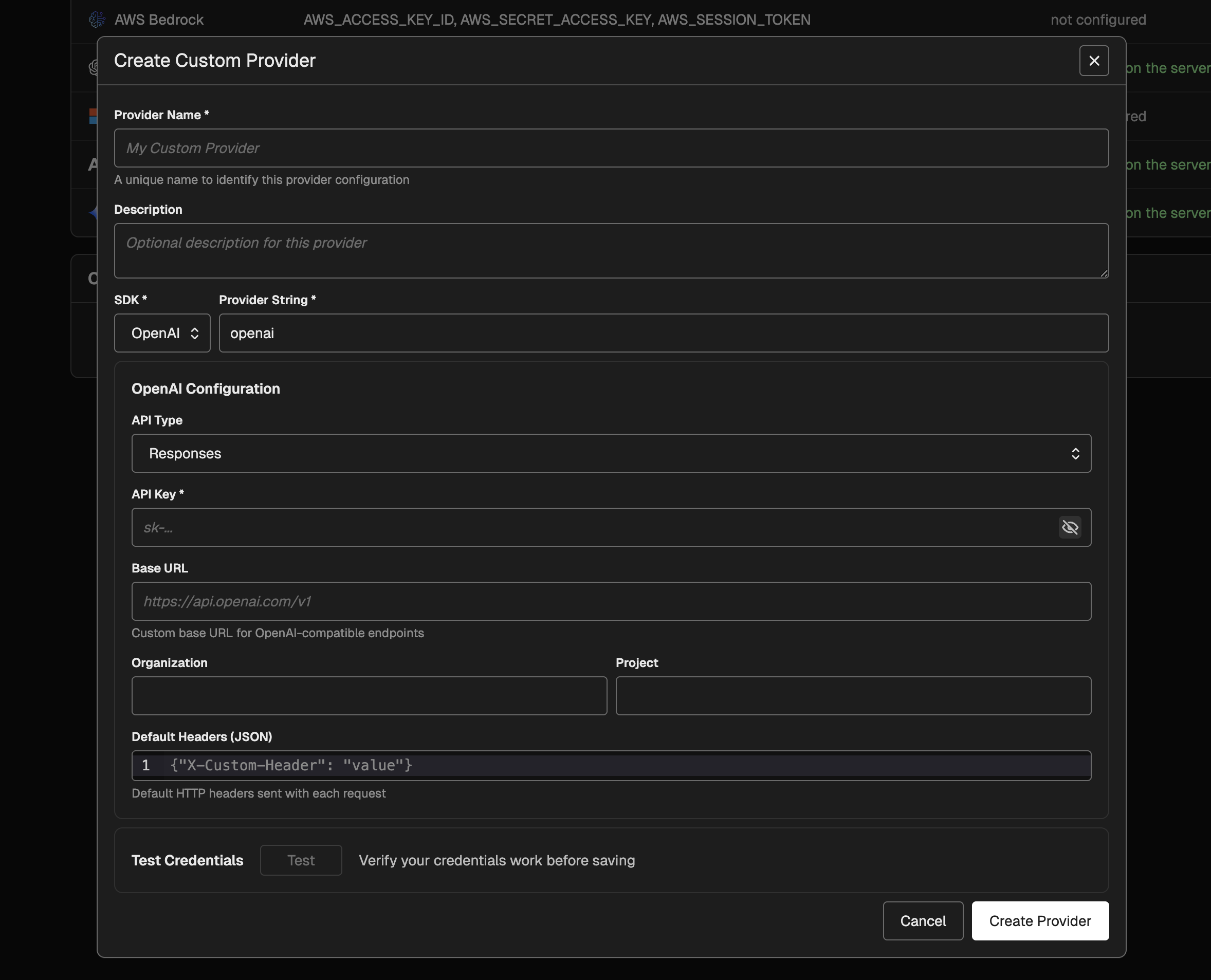
**Key capabilities:**
* **Centralized configuration:** Manage provider credentials and routing in Settings and reuse them across the playground and prompt versions.
* **SDK-specific authentication:** Support API keys, Azure AD token providers, or default credentials (Azure/AWS) depending on the SDK.
* **Model selection integration:** Custom providers show up in model menus as their own provider group and inherit model listings from the underlying SDK.
* **Request-level overrides:** Continue to supply custom request headers per prompt while using custom provider configuration for routing and authentication.
To get started, open **Settings → AI Providers → Custom Providers**, create a provider configuration, and select it from the model menu in the playground.
Phoenix playground now supports Claude Opus 4.6, Anthropic's latest flagship model. Select `claude-opus-4-6` in the Anthropic provider or `anthropic.claude-opus-4-6-v1` in AWS Bedrock to start using the model with full extended thinking parameter support and accurate cost tracking.
**Key capabilities:**
* **Anthropic provider integration:** Access Claude Opus 4.6 directly through the playground with the `thinking` invocation parameter enabled for extended reasoning workflows
* **AWS Bedrock support:** Deploy Opus 4.6 through Bedrock with the region-specific model identifier
* **Automatic cost tracking:** Token costs are calculated using the latest pricing ($5 per million input tokens, $25 per million output tokens, plus cache read/write rates)
The model appears in playground dropdowns alongside other Claude models and inherits the same reasoning capabilities as other Claude 4.x models.
**Available in arize-phoenix-evals 0.16.0+ (Python) and @arizeai/phoenix-evals 1.3.0+ (TypeScript)**
Phoenix now provides two specialized evaluators for assessing AI agent tool usage. The **Tool Selection Evaluator** judges whether an agent correctly chose the most appropriate tool from its available toolkit to answer a user's question, without evaluating the parameters passed. The **Tool Invocation Evaluator** assesses whether the agent correctly invoked a tool with proper parameters, JSON formatting, and safe values.
These evaluators help developers:
* **Identify tool selection errors** where agents choose suboptimal or incorrect tools
* **Debug parameter issues** including hallucinated fields, malformed JSON, and incorrect values
* **Improve tool descriptions** and agent prompts based on systematic evaluation
* **Validate multi-tool and multi-turn interactions** across complex agent workflows
Both evaluators are available as `ToolSelectionEvaluator` and `ToolInvocationEvaluator` in Python's `phoenix.evals.metrics` module, and as `createToolSelectionEvaluator` and `createToolInvocationEvaluator` in TypeScript.
**Available in Phoenix 12.33.1+**
Phoenix now supports custom email extraction from OAuth2 identity providers through the `PHOENIX_OAUTH2_{IDP}_EMAIL_ATTRIBUTE_PATH` environment variable. This solves authentication issues with providers like Azure AD/Entra ID where the standard `email` claim may be null but alternative claims like `preferred_username` contain the user's identity.
Configure email extraction using JMESPath expressions:
```bash theme={null}
PHOENIX_OAUTH2_AZURE_AD_EMAIL_ATTRIBUTE_PATH=preferred_username
PHOENIX_OAUTH2_CUSTOM_IDP_EMAIL_ATTRIBUTE_PATH=user.contact.email
```
The default behavior remains unchanged, using the standard OIDC `email` claim when no custom path is specified. JMESPath expressions are validated at startup for immediate feedback on configuration errors.
**Available in @arizeai/phoenix-cli 0.4.0+**
The Phoenix CLI now provides comprehensive commands for managing prompts, datasets, and experiments directly from your terminal. Access version-controlled prompts, create evaluation datasets, and run experiments—all without leaving your development environment.
**Prompt Management:**
* **List and view prompts** with `px prompts` and `px prompt `
* **Pipe prompts to AI assistants** for optimization and analysis
* **Text format output** with XML-style role tags for LLM consumption
**Dataset Operations:**
* **Create and manage datasets** with `px datasets` and `px dataset `
* **Add examples** and query dataset contents
* **Export datasets** for offline analysis
**Experiment Workflows:**
* **Run experiments** and compare results across configurations
* **View experiment details** and performance metrics
* **Track changes** across prompt and model variations
These commands integrate seamlessly with AI coding assistants and enable systematic testing of LLM applications through terminal-based workflows.
**Available in @arizeai/phoenix-cli 0.4.0+**
The Phoenix CLI now includes enhanced authentication configuration commands, resolving database race conditions and improving connection reliability. Users can configure authentication settings directly through the CLI for more predictable and stable connections to Phoenix servers.
**Available in arize-phoenix-client 1.28.0+ (Python) and @arizeai/phoenix-client 2.0.0+ (TypeScript)**
Phoenix now enables converting production traces into curated datasets while preserving bidirectional links back to source spans. Use the new `span_id_key` parameter to maintain traceability from evaluation examples to their original production executions.
**Python Example:**
```python theme={null}
from phoenix.client import Client
client = Client()
dataset = client.datasets.create_dataset(
name="production-queries",
dataframe=spans_df,
input_keys=["input"],
output_keys=["output"],
span_id_key="context.span_id" # Links examples to spans
)
```
**TypeScript Example:**
```typescript theme={null}
import { createClient } from '@arizeai/phoenix-client';
const client = createClient();
await client.createDataset({
name: "production-queries",
examples: examples.map(ex => ({
input: ex.input,
output: ex.output,
spanId: ex.spanId // Preserves trace links
}))
});
```
Key capabilities:
* **Batch resolution** of span IDs for optimal performance
* **Graceful fallback** when span IDs are missing or invalid
* **Backwards compatible** with existing dataset creation workflows
* **Bidirectional navigation** between evaluation results and production traces
**Available in @arizeai/phoenix-cli 0.3.0+**
The Phoenix CLI now supports exporting annotations alongside traces using the `--include-annotations` flag. Annotations—including manual labels, LLM evaluation scores, and programmatic feedback—are now preserved when exporting traces for offline analysis, backup, or migration workflows.
```bash theme={null}
px traces export --include-annotations > traces_with_feedback.jsonl
```
This enables teams to maintain complete evaluation history when moving data between environments or conducting retrospective analysis of model performance.
📝
**Available in @arizeai/phoenix-cli 0.4.0+**
Phoenix CLI now supports prompt introspection with `px prompts` and `px prompt`. List prompts, view their content, and pipe them directly to AI assistants like Claude Code for optimization suggestions. The `--format text` option outputs prompts with XML-style role tags, ideal for analysis workflows.
🔗
**Available in arize-phoenix-client 1.28.0+ (Python) and @arizeai/phoenix-client 2.0.0+ (TypeScript)**
The Phoenix client now enables converting production traces into curated datasets while preserving associations back to source spans. Query spans using client methods, then create datasets with span associations to maintain bidirectional links. Use this to build golden datasets from validated interactions, curate edge cases from failed traces, or create regression test suites from critical user flows.
🧪
**Available in @arizeai/phoenix-cli 0.2.0+**
The Phoenix CLI now supports datasets, experiments, and annotations. Pull evaluation data, export experiment results, and access human feedback directly from the terminal. Works well with AI coding assistants for analyzing test cases and reviewing results.
🖥️
**Available in @arizeai/phoenix-cli 0.1.0+**
AI coding assistants operate through terminals and files—they run shell commands, read output, and process data. The new Phoenix CLI makes trace data accessible through these interfaces, enabling tools like Claude Code, Cursor, and Windsurf to query your Phoenix instance directly. Export traces to JSON, pipe to `jq`, or save to disk for analysis.
💬
**Available in Phoenix 13.0+**
The Prompt Playground now supports appending conversation history from dataset examples to your prompts. This enables powerful A/B testing workflows for comparing models and system prompts against the same conversation threads. Specify a dot-notation path to messages in your dataset (e.g., `messages` or `input.messages`) and run experiments across all prompt variants.
⚙️
**Available in Phoenix 12.27+**
Phoenix now offers enhanced user preference settings, giving you more control over your experience. This update includes theme selection in viewer preferences and programming language preference.
🤖
**Available in Phoenix 12.25+**
Phoenix now supports Gemini tool calls, enabling enhanced integration capabilities with Google's Gemini models. This update allows for more robust and feature-complete interactions with Gemini, including improved request/response translation and advanced conversation handling with tool calls.
📝
**Available in Phoenix 12.21+**
New dedicated endpoints for span notes enable open coding and seamless annotation integrations. Add notes to spans programmatically using the Phoenix client in both Python and TypeScript—perfect for debugging sessions, human feedback, and building custom annotation pipelines.
🔐
**Available in Phoenix 12.20+**
Phoenix now supports authentication against LDAP directories, enabling integration with enterprise identity infrastructure including Microsoft Active Directory, OpenLDAP, and any LDAP v3 compliant directory. Key features include group-based role mapping, multi-server failover, TLS encryption, and automatic user provisioning.
💬
**Available in phoenix-evals 0.22+ (Python) and @arizeai/phoenix-evals 2.0+ (TypeScript)**
Phoenix evaluators now support flexible prompt formats including simple string templates and OpenAI-style message arrays for multi-turn prompts. Python supports both f-string and mustache syntax, while TypeScript uses mustache syntax. Adapters handle provider-specific transformations automatically.
🧪
**Available in @arizeai/phoenix-evals 2.0+**
The `createEvaluator` utility provides a type-safe way to build custom code evaluators for experiments in TypeScript. Define evaluators with full type inference, access `input`, `output`, `expected`, and `metadata` parameters, and integrate seamlessly with `runExperiment`.
📊
**Available in Phoenix 12.20+**
You can now view and filter experiment results by data splits directly in the experiments table. This enhancement makes it easier to analyze performance across different data subsets (such as train, validation, and test) and compare how your models perform on each split.
🤖
**Available in Phoenix 12.18+**
 Phoenix now supports Claude Opus 4 and 4-5 as models you can invoke from the Playground.
🔐
**Available in Phoenix 12.18+**
Phoenix now supports Claude Opus 4 and 4-5 as models you can invoke from the Playground.
🔐
**Available in Phoenix 12.18+**
 The Playground now clearly indicates when server credentials are configured.
🗂️
**Available in Phoenix 12.18+**
You can now assign data splits (ex: train/test/validation) directly when uploading a dataset into Arize Phoenix.
🛝
**Available in Phoenix 12.17+**
The Playground now clearly indicates when server credentials are configured.
🗂️
**Available in Phoenix 12.18+**
You can now assign data splits (ex: train/test/validation) directly when uploading a dataset into Arize Phoenix.
🛝
**Available in Phoenix 12.17+**
 This update adds an easy way to run several repetitions of the same prompt directly from the Playground.
🔧
**Available in Phoenix 12.15+**
This update enhances LLM provider support by adding **OpenAI v5.1** compatibility (including reasoning capabilities), expanding support for **Google DeepMind/Gemini** models, and introducing the **gemini-3** model variant.
🧠
**Available in Phoenix 12.15+**
This update enhances the Anthropic model registrations in Arize Phoenix by adding support for the **4.5 Sonnet/Haiku variants** and removing several legacy **3.x Sonnet/Opus entries.**
💻
This update adds an easy way to run several repetitions of the same prompt directly from the Playground.
🔧
**Available in Phoenix 12.15+**
This update enhances LLM provider support by adding **OpenAI v5.1** compatibility (including reasoning capabilities), expanding support for **Google DeepMind/Gemini** models, and introducing the **gemini-3** model variant.
🧠
**Available in Phoenix 12.15+**
This update enhances the Anthropic model registrations in Arize Phoenix by adding support for the **4.5 Sonnet/Haiku variants** and removing several legacy **3.x Sonnet/Opus entries.**
💻
 * Added **easy manual instrumentation** with the same decorators, wrappers, and attribute helpers found in the Python `openinference-instrumentation` package.
* Introduced **function tracing utilities** that automatically create spans for sync/async function execution, including specialized wrappers for **chains**, **agents**, and **tools**.
* Added **decorator-based method tracing**, enabling automatic span creation on class methods via the `@observe` decorator.
* Expanded **attribute helper utilities** for standardized OpenTelemetry metadata creation, including helpers for **inputs/outputs**, **LLM operations**, **embeddings**, **retrievers**, and **tool definitions**.
* Overall, tracing workflows, agent behavior, and external tool calls is now significantly simpler and more consistent across languages.
🌍
**Available in Phoenix 12.11+**
* Added **easy manual instrumentation** with the same decorators, wrappers, and attribute helpers found in the Python `openinference-instrumentation` package.
* Introduced **function tracing utilities** that automatically create spans for sync/async function execution, including specialized wrappers for **chains**, **agents**, and **tools**.
* Added **decorator-based method tracing**, enabling automatic span creation on class methods via the `@observe` decorator.
* Expanded **attribute helper utilities** for standardized OpenTelemetry metadata creation, including helpers for **inputs/outputs**, **LLM operations**, **embeddings**, **retrievers**, and **tool definitions**.
* Overall, tracing workflows, agent behavior, and external tool calls is now significantly simpler and more consistent across languages.
🌍
**Available in Phoenix 12.11+**
 This update adds a new **display timezone preference** feature for users: you can now specify how timestamps are shown across the UI, making time-based data more intuitive and aligned with your locale.
🗂️
**Available in Phoenix 12.10+**
This update adds a new **display timezone preference** feature for users: you can now specify how timestamps are shown across the UI, making time-based data more intuitive and aligned with your locale.
🗂️
**Available in Phoenix 12.10+**
 Added full prompt-level metadata support across API, UI, and clients: you can now create, clone, patch, and display a JSON `metadata` field for prompts.
🏷️
**Available in Phoenix 12.10+**
Added full prompt-level metadata support across API, UI, and clients: you can now create, clone, patch, and display a JSON `metadata` field for prompts.
🏷️
**Available in Phoenix 12.10+**
 You can now view dataset labels as you load datasets into the Playground. This enhancement makes it easier to identify and select your desired dataset.
🔄
**Available in Phoenix 12.10+**
This release allows you to resume your experiments and evaluations at your convenience. If certain examples fail, there is no need to repeat an entire task you already completed. This feature provides you with new management capabilities across servers and clients. It's designed to save effort, making your experimentation workflow more flexible.
🧩
**Available in Phoenix 12.9+**
You can now view dataset labels as you load datasets into the Playground. This enhancement makes it easier to identify and select your desired dataset.
🔄
**Available in Phoenix 12.10+**
This release allows you to resume your experiments and evaluations at your convenience. If certain examples fail, there is no need to repeat an entire task you already completed. This feature provides you with new management capabilities across servers and clients. It's designed to save effort, making your experimentation workflow more flexible.
🧩
**Available in Phoenix 12.9+**
 Added **metadata support for experiment run annotations**, with GraphQL updates to fetch and expose this information. The annotation details view now displays formatted JSON metadata across both **compare** and **example** views for easier inspection and debugging.
🔐
**Available in Phoenix 12.9+**
Added support for **AWS IAM–based authentication** for PostgreSQL connections to **AWS Aurora and RDS**. This enhancement enables the use of **short-lived IAM tokens** instead of static passwords, improving security and compliance for database access.
䷖
**Available in Phoenix 12.8+**
Added **metadata support for experiment run annotations**, with GraphQL updates to fetch and expose this information. The annotation details view now displays formatted JSON metadata across both **compare** and **example** views for easier inspection and debugging.
🔐
**Available in Phoenix 12.9+**
Added support for **AWS IAM–based authentication** for PostgreSQL connections to **AWS Aurora and RDS**. This enhancement enables the use of **short-lived IAM tokens** instead of static passwords, improving security and compliance for database access.
䷖
**Available in Phoenix 12.8+**
 Added a new **"Split"** dropdown to single-example view on the dataset pages, allowing users to update the data split classification (e.g., train/validation/test) directly from the example level. This improvement makes it easier to correct or adjust split assignments dynamically.
🏷️
**Available in Phoenix 12.7+**
Added a new **"Split"** dropdown to single-example view on the dataset pages, allowing users to update the data split classification (e.g., train/validation/test) directly from the example level. This improvement makes it easier to correct or adjust split assignments dynamically.
🏷️
**Available in Phoenix 12.7+**
 Added filtering by label on the Prompts page—users can now pick one or more labels to narrow the prompts list.
䷖
**Available in Phoenix 12.7+**
In Arize Phoenix, *splits* let you categorize your dataset into distinct subsets—such as **train**, **validation**, or **test**—enabling structured workflows for experiments and evaluations. This capability offers more flexibility in how you organize, filter, and compare your data across different stages or experimental conditions.
✍️
**Available in Phoenix 12.7+**
Added filtering by label on the Prompts page—users can now pick one or more labels to narrow the prompts list.
䷖
**Available in Phoenix 12.7+**
In Arize Phoenix, *splits* let you categorize your dataset into distinct subsets—such as **train**, **validation**, or **test**—enabling structured workflows for experiments and evaluations. This capability offers more flexibility in how you organize, filter, and compare your data across different stages or experimental conditions.
✍️
**Available in Phoenix 12.7+**
 Added filtering of annotations in the experiment compare slideover so that only annotations present on the selected experiment runs are displayed. This ensures a cleaner UI and avoids filters for annotations that don't appear in the comparison set.
🔍
**Available in Phoenix 12.5+**
Added filtering of annotations in the experiment compare slideover so that only annotations present on the selected experiment runs are displayed. This ensures a cleaner UI and avoids filters for annotations that don't appear in the comparison set.
🔍
**Available in Phoenix 12.5+**
 Added filtering capabilities to the **Dataset Examples table**, allowing users to search examples by text or split ID. Additionally, the split-management filter menu has been reorganized to separate filtering by splits from split management actions.
🧪
**Available in Phoenix 12.5+**
Added filtering capabilities to the **Dataset Examples table**, allowing users to search examples by text or split ID. Additionally, the split-management filter menu has been reorganized to separate filtering by splits from split management actions.
🧪
**Available in Phoenix 12.5+**
 We've added trace-links to the experiment compare slideover for runs and annotations. Clicking the new trace icons opens the Trace View.
👀
**Available in Phoenix 12.5+**
Introduced a new **VIEWER role** with enforced read-only permissions across both GraphQL and REST APIs, improving access control and security.
🏷️
**Available in Phoenix 12.3+**
We've added trace-links to the experiment compare slideover for runs and annotations. Clicking the new trace icons opens the Trace View.
👀
**Available in Phoenix 12.5+**
Introduced a new **VIEWER role** with enforced read-only permissions across both GraphQL and REST APIs, improving access control and security.
🏷️
**Available in Phoenix 12.3+**
 Added support for **dataset labels** — you can now label datasets and view these labels in a dedicated column on the dataset list page, making it easier to **filter and group datasets**. All dataset labels can also be managed and viewed in the **"Datasets" tab** on the Settings page.
📃
**Available in Phoenix 12.3+**
Added support for **dataset labels** — you can now label datasets and view these labels in a dedicated column on the dataset list page, making it easier to **filter and group datasets**. All dataset labels can also be managed and viewed in the **"Datasets" tab** on the Settings page.
📃
**Available in Phoenix 12.3+**
 We added pagination to the **experiment comparison slideover** on the list page for smoother navigation through results. We also introduced a new **repetition number column**, visible only when the base experiment includes multiple repetitions.
🛝
**Available in Phoenix 12.2+**
We added pagination to the **experiment comparison slideover** on the list page for smoother navigation through results. We also introduced a new **repetition number column**, visible only when the base experiment includes multiple repetitions.
🛝
**Available in Phoenix 12.2+**
 We have added support for **selecting and loading prompts by tag** in the Playground. Users can now open specific prompts tagged for easier comparison and reproducibility.
🛝
**Available in Phoenix 12.2+**
We have added support for **selecting and loading prompts by tag** in the Playground. Users can now open specific prompts tagged for easier comparison and reproducibility.
🛝
**Available in Phoenix 12.2+**
 We added support for **prompt versioning in the Playground** — users can now select, edit, and experiment with specific prompt versions directly. This update improves traceability and reproducibility for prompt iterations, making it easier to manage and compare different versions.
⚡
**Available in Phoenix 12.1+**
Day-0 support for Claude Sonnet 4.5.
📊
**Available in Phoenix 12.0+**
Add support for custom dataset splits to organize examples by category.
**Available in Phoenix 12.0+**
We added support for **prompt versioning in the Playground** — users can now select, edit, and experiment with specific prompt versions directly. This update improves traceability and reproducibility for prompt iterations, making it easier to manage and compare different versions.
⚡
**Available in Phoenix 12.1+**
Day-0 support for Claude Sonnet 4.5.
📊
**Available in Phoenix 12.0+**
Add support for custom dataset splits to organize examples by category.
**Available in Phoenix 12.0+**
 You can now annotate sessions with conversational evaluations like coherency and tone.
🔁
**Available in Phoenix 11.38+**
Support for repetitions is now enabled in Playground and SDK workflows.
🛠️
**Available in Phoenix 11.36+**
You can now annotate sessions with conversational evaluations like coherency and tone.
🔁
**Available in Phoenix 11.38+**
Support for repetitions is now enabled in Playground and SDK workflows.
🛠️
**Available in Phoenix 11.36+**
 Enable configuring custom HTTP headers for playground requests.
🔄
**Available in Phoenix 11.36+**
Show experiment repetitions as separate cards in the compare slideover 🔄
🌐
**Available in Phoenix 11.35+**
🔍
**Available in Phoenix 11.34+**
Added a slideover in the experiments list view to show compare details inline.
**Available in Phoenix 11.33+**
We’ve added support for labeling prompts so you can categorize them by use-case, provider, or any custom tag.
**Available in Phoenix 11.33+**
We’ve added paging functionality to the Experiment Compare details slide-over view, allowing users to navigate between individual examples using arrow buttons or keyboard shortcuts (`J` / `K`). Pagination
## See more
2026
Enable configuring custom HTTP headers for playground requests.
🔄
**Available in Phoenix 11.36+**
Show experiment repetitions as separate cards in the compare slideover 🔄
🌐
**Available in Phoenix 11.35+**
🔍
**Available in Phoenix 11.34+**
Added a slideover in the experiments list view to show compare details inline.
**Available in Phoenix 11.33+**
We’ve added support for labeling prompts so you can categorize them by use-case, provider, or any custom tag.
**Available in Phoenix 11.33+**
We’ve added paging functionality to the Experiment Compare details slide-over view, allowing users to navigate between individual examples using arrow buttons or keyboard shortcuts (`J` / `K`). Pagination
## See more
2026