> ## Documentation Index
> Fetch the complete documentation index at: https://arizeai-433a7140.mintlify.site/llms.txt
> Use this file to discover all available pages before exploring further.
# Tag a prompt
> How to deploy prompts to different environments safely
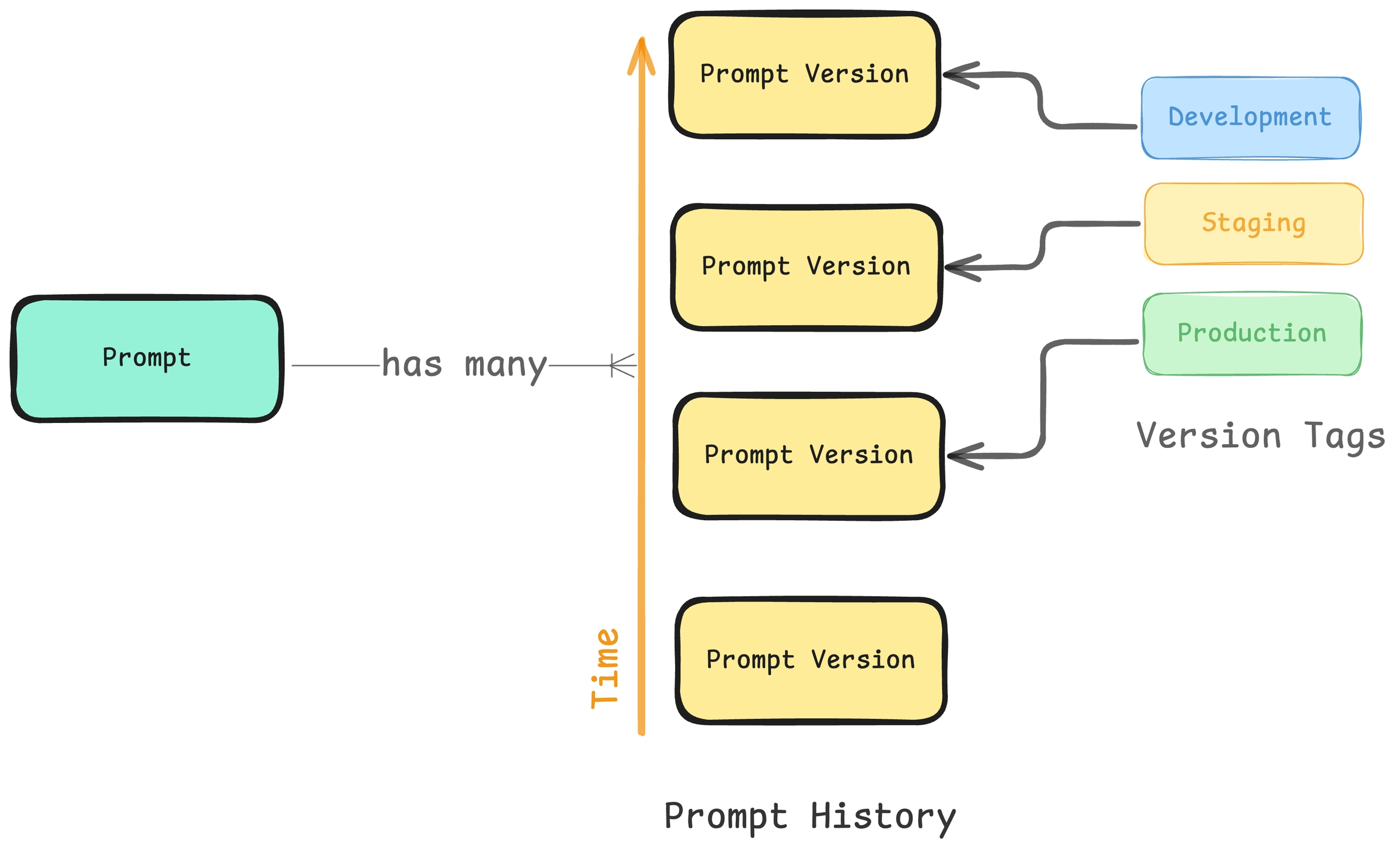
Prompts in Phoenix are versioned in a linear history, creating a comprehensive audit trail of all modifications. Each change is tracked, allowing you to:
* Review the complete history of a prompt
* Understand who made specific changes
* Revert to previous versions if needed
 ## Creating a Tag
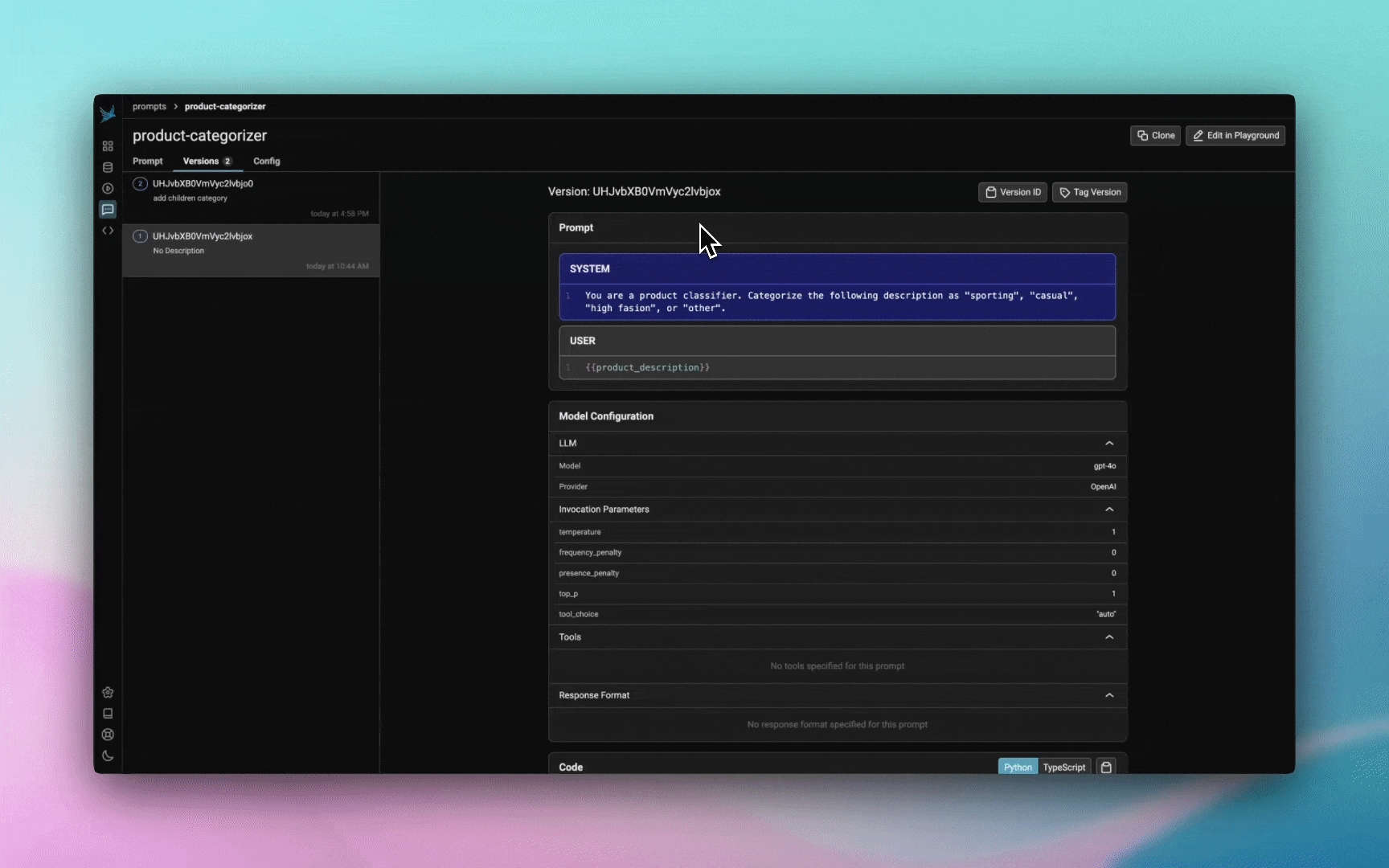
When you are ready to deploy a prompt to a certain environment (let's say staging), the best thing to do is to tag a specific version of your prompt as **ready**. By default Phoenix offers 3 tags, **production**, **staging**, and **development** but you can create your own tags as well.
Each tag can include an optional description to provide additional context about its purpose or significance. Tags are unique per prompt, meaning you cannot have two tags with the same name for the same prompt.
## Creating a Tag
When you are ready to deploy a prompt to a certain environment (let's say staging), the best thing to do is to tag a specific version of your prompt as **ready**. By default Phoenix offers 3 tags, **production**, **staging**, and **development** but you can create your own tags as well.
Each tag can include an optional description to provide additional context about its purpose or significance. Tags are unique per prompt, meaning you cannot have two tags with the same name for the same prompt.
 ## Creating a custom tag
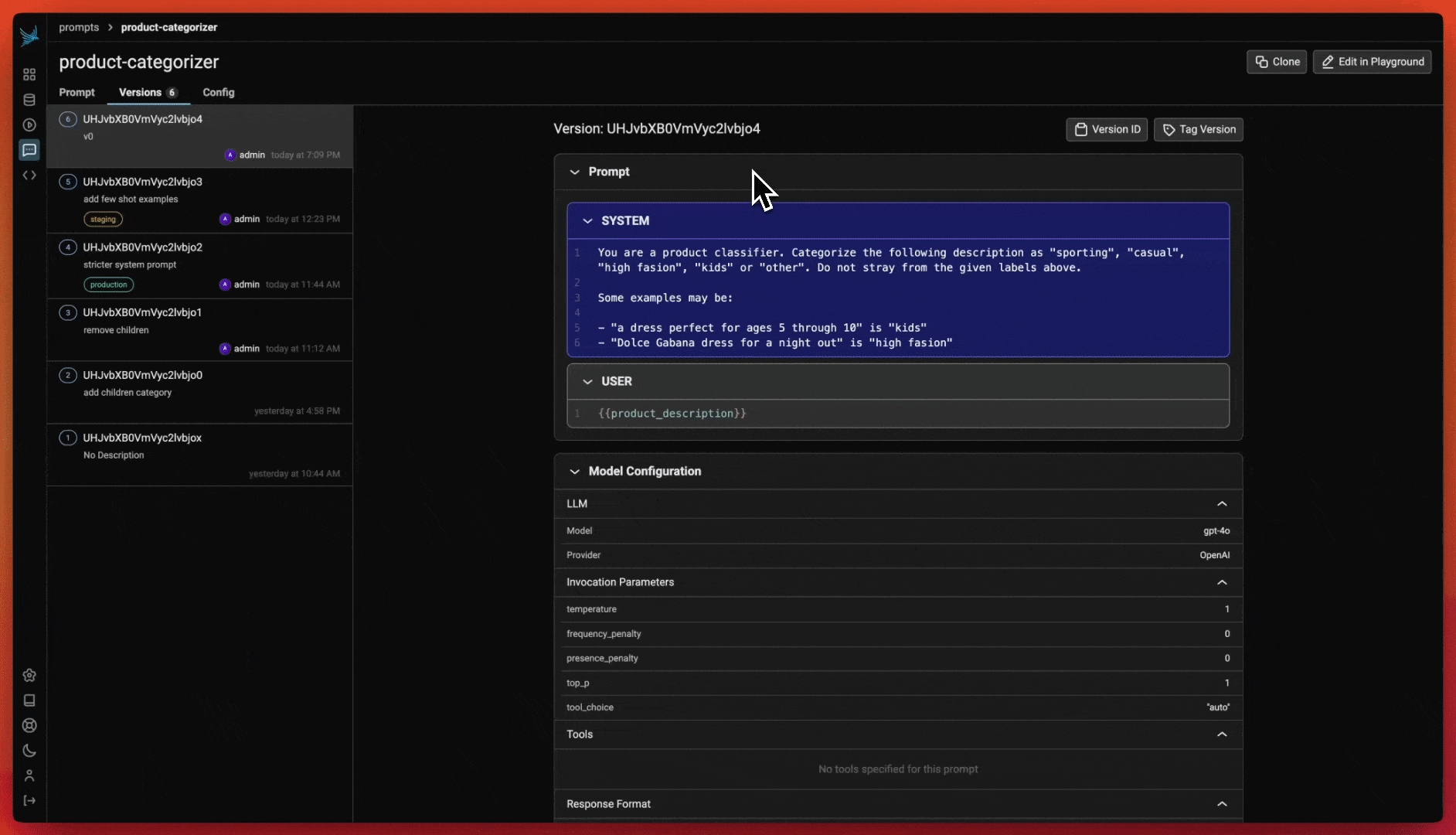
It can be helpful to have custom tags to track different versions of a prompt. For example if you wanted to tag a certain prompt as the one that was used in your v0 release, you can create a custom tag with that name to keep track!
When creating a custom tag, you can provide:
* A name for the tag (must be a valid identifier)
* An optional description to provide context about the tag's purpose
## Creating a custom tag
It can be helpful to have custom tags to track different versions of a prompt. For example if you wanted to tag a certain prompt as the one that was used in your v0 release, you can create a custom tag with that name to keep track!
When creating a custom tag, you can provide:
* A name for the tag (must be a valid identifier)
* An optional description to provide context about the tag's purpose
 ## Pulling a prompt by tag
Once a prompt version is tagged, you can pull this version of the prompt into any environment that you would like (an application, an experiment). Similar to git tags, prompt version tags let you create a "release" of a prompt (e.x. pushing a prompt to staging).
You can retrieve a prompt version by:
* Using the tag name directly (e.g., "production", "staging", "development")
* Using a custom tag name
* Using the latest version (which will return the most recent version regardless of tags)
For full details on how to use prompts in code, see [Using a prompt](/docs/phoenix/prompt-engineering/how-to-prompts/using-a-prompt)
## Listing tags
You can list all tags associated with a specific prompt version. The list is paginated, allowing you to efficiently browse through large numbers of tags. Each tag in the list includes:
* The tag's unique identifier
* The tag's name
* The tag's description (if provided)
This is particularly useful when you need to:
* Review all tags associated with a prompt version
* Verify which version is currently tagged for a specific environment
* Track the history of tag changes for a prompt version
## Using the Client
### Tag Naming Rules
Tag names must be valid identifiers: lowercase letters, numbers, hyphens, and underscores, starting and ending with a letter or number.
Examples: `staging`, `production-v1`, `release-2024`
### Creating and Managing Tags
```python theme={null}
from phoenix.client import Client
# Create a tag for a prompt version
Client().prompts.tags.create(
prompt_version_id="version-123",
name="production",
description="Ready for production environment"
)
# List tags for a prompt version
tags = Client().prompts.tags.list(prompt_version_id="version-123")
for tag in tags:
print(f"Tag: {tag.name}, Description: {tag.description}")
# Get a prompt version by tag
prompt_version = Client().prompts.get(
prompt_identifier="my-prompt",
tag="production"
)
```
```python theme={null}
from phoenix.client import AsyncClient
# Create a tag for a prompt version
await AsyncClient().prompts.tags.create(
prompt_version_id="version-123",
name="production",
description="Ready for production environment"
)
# List tags for a prompt version
tags = await AsyncClient().prompts.tags.list(prompt_version_id="version-123")
for tag in tags:
print(f"Tag: {tag.name}, Description: {tag.description}")
# Get a prompt version by tag
prompt_version = await AsyncClient().prompts.get(
prompt_identifier="my-prompt",
tag="production"
)
```
## Pulling a prompt by tag
Once a prompt version is tagged, you can pull this version of the prompt into any environment that you would like (an application, an experiment). Similar to git tags, prompt version tags let you create a "release" of a prompt (e.x. pushing a prompt to staging).
You can retrieve a prompt version by:
* Using the tag name directly (e.g., "production", "staging", "development")
* Using a custom tag name
* Using the latest version (which will return the most recent version regardless of tags)
For full details on how to use prompts in code, see [Using a prompt](/docs/phoenix/prompt-engineering/how-to-prompts/using-a-prompt)
## Listing tags
You can list all tags associated with a specific prompt version. The list is paginated, allowing you to efficiently browse through large numbers of tags. Each tag in the list includes:
* The tag's unique identifier
* The tag's name
* The tag's description (if provided)
This is particularly useful when you need to:
* Review all tags associated with a prompt version
* Verify which version is currently tagged for a specific environment
* Track the history of tag changes for a prompt version
## Using the Client
### Tag Naming Rules
Tag names must be valid identifiers: lowercase letters, numbers, hyphens, and underscores, starting and ending with a letter or number.
Examples: `staging`, `production-v1`, `release-2024`
### Creating and Managing Tags
```python theme={null}
from phoenix.client import Client
# Create a tag for a prompt version
Client().prompts.tags.create(
prompt_version_id="version-123",
name="production",
description="Ready for production environment"
)
# List tags for a prompt version
tags = Client().prompts.tags.list(prompt_version_id="version-123")
for tag in tags:
print(f"Tag: {tag.name}, Description: {tag.description}")
# Get a prompt version by tag
prompt_version = Client().prompts.get(
prompt_identifier="my-prompt",
tag="production"
)
```
```python theme={null}
from phoenix.client import AsyncClient
# Create a tag for a prompt version
await AsyncClient().prompts.tags.create(
prompt_version_id="version-123",
name="production",
description="Ready for production environment"
)
# List tags for a prompt version
tags = await AsyncClient().prompts.tags.list(prompt_version_id="version-123")
for tag in tags:
print(f"Tag: {tag.name}, Description: {tag.description}")
# Get a prompt version by tag
prompt_version = await AsyncClient().prompts.get(
prompt_identifier="my-prompt",
tag="production"
)
```