> ## Documentation Index
> Fetch the complete documentation index at: https://arizeai-433a7140.mintlify.site/llms.txt
> Use this file to discover all available pages before exploring further.
# TanStack AI Tracing
> Instrument TanStack AI chat, tool-calling, and agent loops with OpenInference middleware
[](https://badge.fury.io/js/@arizeai%2Fopeninference-tanstack-ai)
`@arizeai/openinference-tanstack-ai` provides an OpenInference middleware for [TanStack AI](https://tanstack.com/ai/latest/docs/getting-started/overview). It emits OpenTelemetry spans shaped according to the OpenInference specification so TanStack AI runs can be visualized in [Phoenix](https://phoenix.arize.com/).
This integration is brand new. If you run into issues or have ideas for improvements, please open an issue or discussion in the [OpenInference repo](https://github.com/Arize-ai/openinference).
## Install
```bash theme={null}
npm install --save @arizeai/openinference-tanstack-ai @tanstack/ai
```
You will also need an OpenTelemetry setup in your application. The recommended quick start is to pair it with `@arizeai/phoenix-otel`:
```bash theme={null}
npm install --save @arizeai/phoenix-otel
```
Or use a standard OpenTelemetry stack:
```bash theme={null}
npm install --save @opentelemetry/api @opentelemetry/sdk-trace-node @opentelemetry/exporter-trace-otlp-proto
```
Install the provider adapter you plan to use with TanStack AI as well, for example:
```bash theme={null}
npm install --save @tanstack/ai-openai
```
## Setup
Register your tracer provider before the middleware is applied so that spans are emitted to the configured exporter.
```typescript theme={null}
// instrumentation.ts
import { register } from "@arizeai/phoenix-otel";
register({
projectName: "my-tanstack-ai-app",
endpoint:
process.env["PHOENIX_COLLECTOR_ENDPOINT"] ??
"http://localhost:6006/v1/traces",
apiKey: process.env["PHOENIX_API_KEY"],
});
```
```typescript theme={null}
// instrumentation.ts
import { OTLPTraceExporter } from "@opentelemetry/exporter-trace-otlp-proto";
import { resourceFromAttributes } from "@opentelemetry/resources";
import { SimpleSpanProcessor } from "@opentelemetry/sdk-trace-base";
import { NodeTracerProvider } from "@opentelemetry/sdk-trace-node";
import { SEMRESATTRS_PROJECT_NAME } from "@arizeai/openinference-semantic-conventions";
const tracerProvider = new NodeTracerProvider({
resource: resourceFromAttributes({
[SEMRESATTRS_PROJECT_NAME]: "my-tanstack-ai-app",
}),
spanProcessors: [
new SimpleSpanProcessor(
new OTLPTraceExporter({
url:
process.env["PHOENIX_COLLECTOR_ENDPOINT"] ??
"http://localhost:6006/v1/traces",
headers:
process.env["PHOENIX_API_KEY"] == null
? undefined
: {
Authorization: `Bearer ${process.env["PHOENIX_API_KEY"]}`,
},
}),
),
],
});
tracerProvider.register();
```
Your instrumentation code should run before the middleware is applied. Import `instrumentation.ts` at the top of your application's entrypoint, or run with `node --import ./instrumentation.ts index.ts`.
## Usage
`@arizeai/openinference-tanstack-ai` exports `openInferenceMiddleware`, which plugs directly into TanStack AI's `middleware` option. The middleware works for both streaming and non-streaming TanStack AI calls.
```typescript theme={null}
import { chat } from "@tanstack/ai";
import { openaiText } from "@tanstack/ai-openai";
import { openInferenceMiddleware } from "@arizeai/openinference-tanstack-ai";
const stream = chat({
adapter: openaiText("gpt-4o-mini"),
messages: [{ role: "user", content: "What is OpenInference?" }],
middleware: [openInferenceMiddleware()],
});
```
Non-streaming calls are instrumented the same way:
```typescript theme={null}
const text = await chat({
adapter: openaiText("gpt-4o-mini"),
stream: false,
systemPrompts: ["You are a concise technical explainer."],
messages: [
{ role: "user", content: "Explain OpenInference in one sentence." },
],
middleware: [openInferenceMiddleware()],
});
```
## Chat With Tools
Tool calls are captured as `TOOL` spans nested under the corresponding `LLM` span. Here is a complete example using OpenAI and a single weather tool:
```typescript theme={null}
import "./instrumentation";
import {
chat,
maxIterations,
streamToText,
toolDefinition,
} from "@tanstack/ai";
import { openaiText } from "@tanstack/ai-openai";
import { trace } from "@opentelemetry/api";
import { z } from "zod";
import { openInferenceMiddleware } from "@arizeai/openinference-tanstack-ai";
const weatherTool = toolDefinition({
name: "getWeather",
description: "Get the weather for a city",
inputSchema: z.object({ city: z.string() }),
outputSchema: z.object({
forecast: z.string(),
temperatureF: z.number(),
}),
}).server(async ({ city }) => {
return {
forecast: city === "Boston" ? "sunny" : "cloudy",
temperatureF: city === "Boston" ? 70 : 65,
};
});
async function main() {
const tracer = trace.getTracer("tanstack-ai-example");
const stream = chat({
adapter: openaiText("gpt-4o-mini"),
messages: [
{ role: "user", content: "What is the weather in Boston? Use the tool." },
],
tools: [weatherTool],
agentLoopStrategy: maxIterations(3),
middleware: [openInferenceMiddleware({ tracer })],
});
const text = await streamToText(stream);
console.log(text);
}
main().catch((error) => {
console.error(error);
process.exitCode = 1;
});
```
## Custom Tracer
By default, the middleware uses the global tracer for this package. If your application already has a request-scoped or custom tracer, pass it explicitly:
```typescript theme={null}
import { trace } from "@opentelemetry/api";
import { openInferenceMiddleware } from "@arizeai/openinference-tanstack-ai";
const tracer = trace.getTracer("tanstack-ai-request");
const middleware = openInferenceMiddleware({ tracer });
```
This is useful when you want the middleware to participate in a specific tracer setup without relying on the global default.
## What Gets Traced
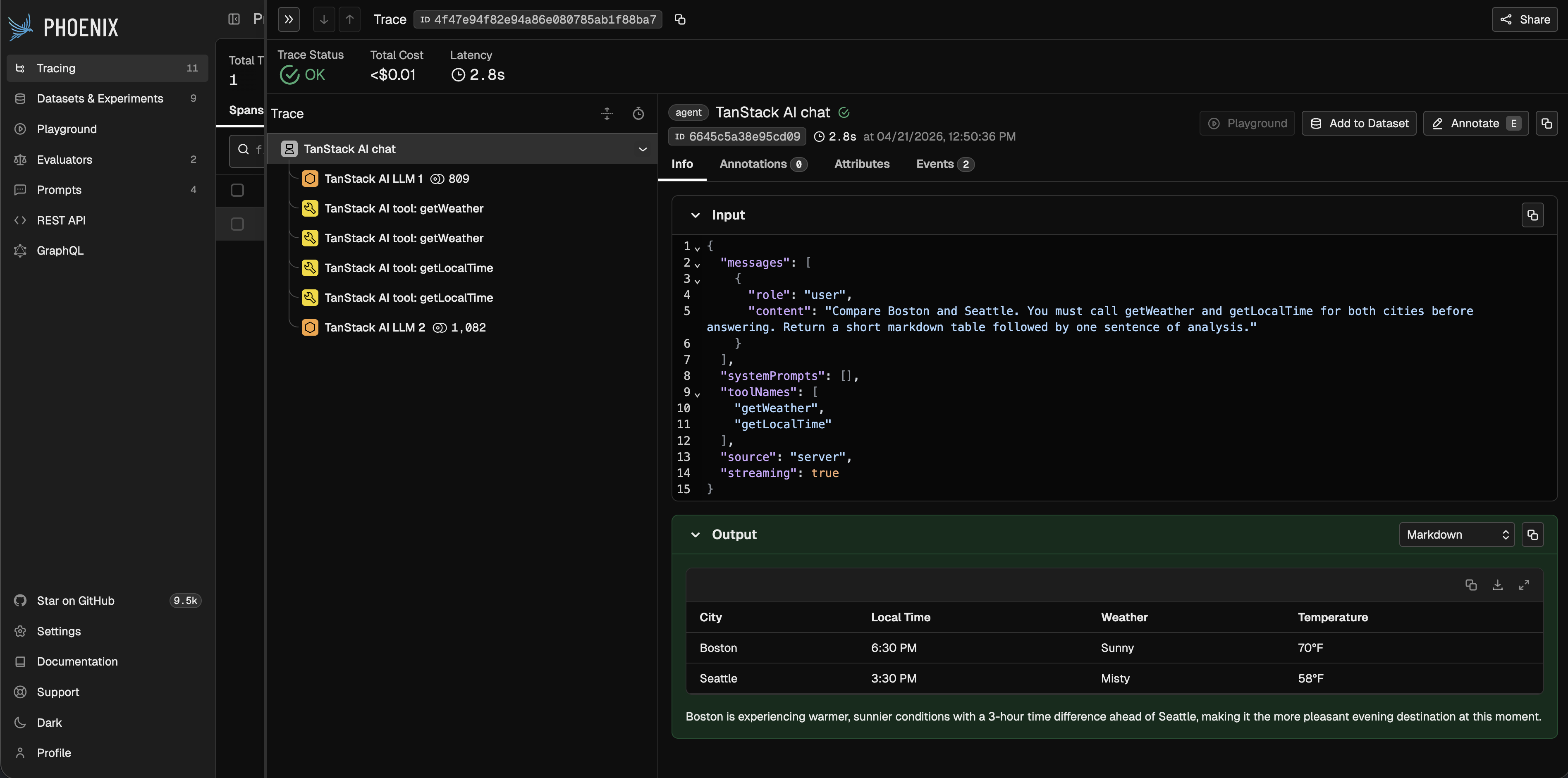
The middleware emits the following span structure for a TanStack AI run:
* One `AGENT` span for the overall `chat()` invocation
* One `LLM` span for each model turn
* One `TOOL` span for each executed tool call
For a tool loop, the trace will typically look like:
* `AGENT`
* `LLM 1`
* `TOOL`
* `LLM 2`
The `AGENT` span captures the top-level request and final response. The `LLM` spans capture provider/model metadata, input messages, output messages, tool definitions, and token counts. The `TOOL` spans capture tool names, arguments, outputs, and errors.
## Observe
Once instrumented, all TanStack AI runs — including streaming calls, tool loops, and multi-turn conversations — show up in Phoenix with full input, output, and token detail.
 ## Notes
* This package is ESM-only because TanStack AI is ESM-only.
* The middleware works in both server and client environments, but client/server trace stitching depends on your application's context propagation setup.
## Resources
* [TanStack AI documentation](https://tanstack.com/ai/latest/docs/getting-started/overview)
* [OpenInference TanStack AI package](https://www.npmjs.com/package/@arizeai/openinference-tanstack-ai)
* [Examples in the OpenInference repo](https://github.com/Arize-ai/openinference/tree/main/js/packages/openinference-tanstack-ai/examples)
* [Report issues or request enhancements](https://github.com/Arize-ai/openinference)
## Notes
* This package is ESM-only because TanStack AI is ESM-only.
* The middleware works in both server and client environments, but client/server trace stitching depends on your application's context propagation setup.
## Resources
* [TanStack AI documentation](https://tanstack.com/ai/latest/docs/getting-started/overview)
* [OpenInference TanStack AI package](https://www.npmjs.com/package/@arizeai/openinference-tanstack-ai)
* [Examples in the OpenInference repo](https://github.com/Arize-ai/openinference/tree/main/js/packages/openinference-tanstack-ai/examples)
* [Report issues or request enhancements](https://github.com/Arize-ai/openinference)