> ## Documentation Index
> Fetch the complete documentation index at: https://arizeai-433a7140.mintlify.site/llms.txt
> Use this file to discover all available pages before exploring further.
# MCP Tracing
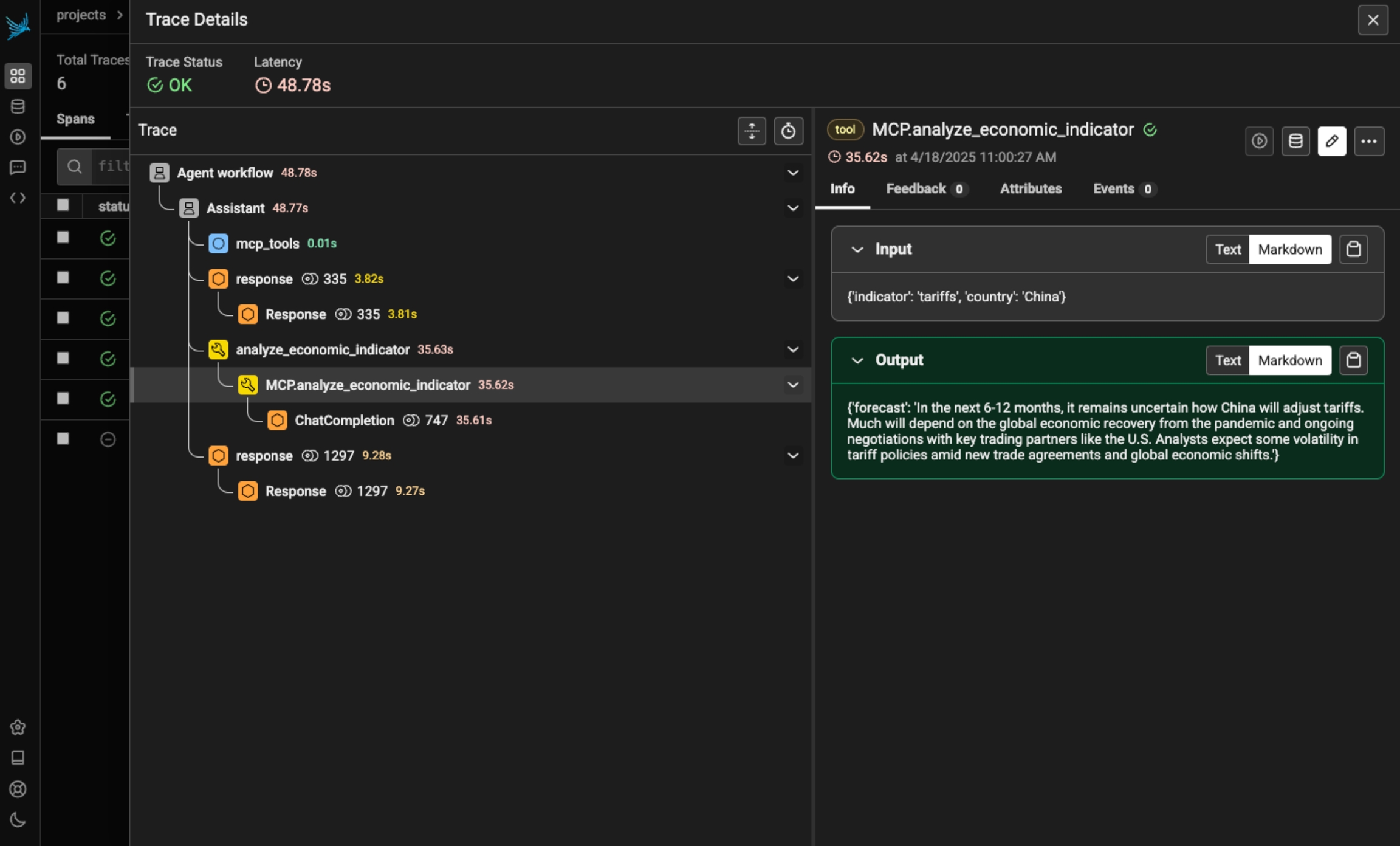
> Phoenix provides tracing for MCP clients and servers through OpenInference. This includes the unique capability to trace client to server interactions under a single trace in the correct hierarchy.
The `openinference-instrumentation-mcp` instrumentor is unique compared to other OpenInference instrumentors. It does not generate any of its own telemetry. Instead, it enables context propagation between MCP clients and servers to unify traces. **You still need generate OpenTelemetry traces in both the client and server to see a unified trace.**
## Install
```bash theme={null}
pip install openinference-instrumentation-mcp
```
Because the MCP instrumentor does not generate its own telemetry, you must use it alongside other instrumentation code to see traces.
The example code below uses OpenAI agents, which you can instrument using:
```bash theme={null}
pip install openinference-instrumentation-openai_agents
```
## Add Tracing to your MCP Client
```python expandable theme={null}
import asyncio
from agents import Agent, Runner
from agents.mcp import MCPServer, MCPServerStdio
from dotenv import load_dotenv
from phoenix.otel import register
load_dotenv()
# Connect to your Phoenix instance
tracer_provider = register(auto_instrument=True)
async def run(mcp_server: MCPServer):
agent = Agent(
name="Assistant",
instructions="Use the tools to answer the users question.",
mcp_servers=[mcp_server],
)
while True:
message = input("\n\nEnter your question (or 'exit' to quit): ")
if message.lower() == "exit" or message.lower() == "q":
break
print(f"\n\nRunning: {message}")
result = await Runner.run(starting_agent=agent, input=message)
print(result.final_output)
async def main():
async with MCPServerStdio(
name="Financial Analysis Server",
params={
"command": "fastmcp",
"args": ["run", "./server.py"],
},
client_session_timeout_seconds=30,
) as server:
await run(server)
if __name__ == "__main__":
asyncio.run(main())
```
### Add Tracing to your MCP Server
```ruby expandable theme={null}
import json
import os
from datetime import datetime, timedelta
import openai
from dotenv import load_dotenv
from mcp.server.fastmcp import FastMCP
from pydantic import BaseModel
from phoenix.otel import register
load_dotenv()
# You must also connect your MCP server to Phoenix
tracer_provider = register(auto_instrument=True)
# Get a tracer to add additional instrumentattion
tracer = tracer_provider.get_tracer("financial-analysis-server")
# Configure OpenAI client
client = openai.OpenAI(api_key=os.environ.get("OPENAI_API_KEY"))
MODEL = "gpt-4-turbo"
# Create MCP server
mcp = FastMCP("Financial Analysis Server")
class StockAnalysisRequest(BaseModel):
ticker: str
time_period: str = "short-term" # short-term, medium-term, long-term
@mcp.tool()
@tracer.tool(name="MCP.analyze_stock") # this OpenInference call adds tracing to this method
def analyze_stock(request: StockAnalysisRequest) -> dict:
"""Analyzes a stock based on its ticker symbol and provides investment recommendations."""
# Make LLM API call to analyze the stock
prompt = f"""
Provide a detailed financial analysis for the stock ticker: {request.ticker}
Time horizon: {request.time_period}
Please include:
1. Company overview
2. Recent financial performance
3. Key metrics (P/E ratio, market cap, etc.)
4. Risk assessment
5. Investment recommendation
Format your response as a JSON object with the following structure:
{{
"ticker": "{request.ticker}",
"company_name": "Full company name",
"overview": "Brief company description",
"financial_performance": "Analysis of recent performance",
"key_metrics": {{
"market_cap": "Value in billions",
"pe_ratio": "Current P/E ratio",
"dividend_yield": "Current yield percentage",
"52_week_high": "Value",
"52_week_low": "Value"
}},
"risk_assessment": "Analysis of risks",
"recommendation": "Buy/Hold/Sell recommendation with explanation",
"time_horizon": "{request.time_period}"
}}
"""
response = client.chat.completions.create(
model=MODEL,
messages=[{"role": "user", "content": prompt}],
response_format={"type": "json_object"},
)
analysis = json.loads(response.choices[0].message.content)
return analysis
# ... define any additional MCP tools you wish
if __name__ == "__main__":
mcp.run()
```
## Observe
Now that you have tracing setup, all invocations of your client and server will be streamed to Phoenix for observability and evaluation, and connected in the platform.
 ### Resources
* [End to end example](https://github.com/Arize-ai/phoenix/tree/main/tutorials/mcp/tracing_between_mcp_client_and_server)
* [OpenInference package](https://github.com/Arize-ai/openinference/tree/main/python/instrumentation/openinference-instrumentation-mcp)
### Resources
* [End to end example](https://github.com/Arize-ai/phoenix/tree/main/tutorials/mcp/tracing_between_mcp_client_and_server)
* [OpenInference package](https://github.com/Arize-ai/openinference/tree/main/python/instrumentation/openinference-instrumentation-mcp)